1) What is Java?Java is the high-level, object-oriented, robust, secure programming language, platform-independent, high performance, Multithreaded, and portable programming language. It was developed by James Gosling in June 1991. It can also be known as the platform as it provides its own JRE and API.
2) What are the differences between C++ and Java?The differences between C++ and Java are given in the following table. | Comparison Index | C++ | Java |
|---|
| Platform-independent | C++ is platform-dependent. | Java is platform-independent. | | Mainly used for | C++ is mainly used for system programming. | Java is mainly used for application programming. It is widely used in window, web-based, enterprise and mobile applications. | | Design Goal | C++ was designed for systems and applications programming. It was an extension of C programming language. | Java was designed and created as an interpreter for printing systems but later extended as a support network computing. It was designed with a goal of being easy to use and accessible to a broader audience. | | Goto | C++ supports the goto statement. | Java doesn't support the goto statement. | | Multiple inheritance | C++ supports multiple inheritance. | Java doesn't support multiple inheritance through class. It can be achieved by interfaces in java. | | Operator Overloading | C++ supports operator overloading. | Java doesn't support operator overloading. | | Pointers | C++ supports pointers. You can write pointer program in C++. | Java supports pointer internally. However, you can't write the pointer program in java. It means java has restricted pointer support in Java. | | Compiler and Interpreter | C++ uses compiler only. C++ is compiled and run using the compiler which converts source code into machine code so, C++ is platform dependent. | Java uses compiler and interpreter both. Java source code is converted into bytecode at compilation time. The interpreter executes this bytecode at runtime and produces output. Java is interpreted that is why it is platform independent. | | Call by Value and Call by reference | C++ supports both call by value and call by reference. | Java supports call by value only. There is no call by reference in java. | | Structure and Union | C++ supports structures and unions. | Java doesn't support structures and unions. | | Thread Support | C++ doesn't have built-in support for threads. It relies on third-party libraries for thread support. | Java has built-in thread support. | | Documentation comment | C++ doesn't support documentation comment. | Java supports documentation comment (/** ... */) to create documentation for java source code. | | Virtual Keyword | C++ supports virtual keyword so that we can decide whether or not override a function. | Java has no virtual keyword. We can override all non-static methods by default. In other words, non-static methods are virtual by default. | | unsigned right shift >>> | C++ doesn't support >>> operator. | Java supports unsigned right shift >>> operator that fills zero at the top for the negative numbers. For positive numbers, it works same like >> operator. | | Inheritance Tree | C++ creates a new inheritance tree always. | Java uses a single inheritance tree always because all classes are the child of Object class in java. The object class is the root of the inheritance tree in java. | | Hardware | C++ is nearer to hardware. | Java is not so interactive with hardware. | | Object-oriented | C++ is an object-oriented language. However, in C language, single root hierarchy is not possible. | Java is also an object-oriented language. However, everything (except fundamental types) is an object in Java. It is a single root hierarchy as everything gets derived from java.lang.Object. |
3) List the features of Java Programming language.There are the following features in Java Programming Language. - Simple: Java is easy to learn. The syntax of Java is based on C++ which makes easier to write the program in it.
- Object-Oriented: Java follows the object-oriented paradigm which allows us to maintain our code as the combination of different type of objects that incorporates both data and behavior.
- Portable: Java supports read-once-write-anywhere approach. We can execute the Java program on every machine. Java program (.java) is converted to bytecode (.class) which can be easily run on every machine.
- Platform Independent: Java is a platform independent programming language. It is different from other programming languages like C and C++ which needs a platform to be executed. Java comes with its platform on which its code is executed. Java doesn't depend upon the operating system to be executed.
- Secured: Java is secured because it doesn't use explicit pointers. Java also provides the concept of ByteCode and Exception handling which makes it more secured.
- Robust: Java is a strong programming language as it uses strong memory management. The concepts like Automatic garbage collection, Exception handling, etc. make it more robust.
- Architecture Neutral: Java is architectural neutral as it is not dependent on the architecture. In C, the size of data types may vary according to the architecture (32 bit or 64 bit) which doesn't exist in Java.
- Interpreted: Java uses the Just-in-time (JIT) interpreter along with the compiler for the program execution.
- High Performance: Java is faster than other traditional interpreted programming languages because Java bytecode is "close" to native code. It is still a little bit slower than a compiled language (e.g., C++).
- Multithreaded: We can write Java programs that deal with many tasks at once by defining multiple threads. The main advantage of multi-threading is that it doesn't occupy memory for each thread. It shares a common memory area. Threads are important for multi-media, Web applications, etc.
- Distributed: Java is distributed because it facilitates users to create distributed applications in Java. RMI and EJB are used for creating distributed applications. This feature of Java makes us able to access files by calling the methods from any machine on the internet.
- Dynamic: Java is a dynamic language. It supports dynamic loading of classes. It means classes are loaded on demand. It also supports functions from its native languages, i.e., C and C++.
4) What do you understand by Java virtual machine?Java Virtual Machine is a virtual machine that enables the computer to run the Java program. JVM acts like a run-time engine which calls the main method present in the Java code. JVM is the specification which must be implemented in the computer system. The Java code is compiled by JVM to be a Bytecode which is machine independent and close to the native code. 5) What is the difference between JDK, JRE, and JVM?JVMJVM is an acronym for Java Virtual Machine; it is an abstract machine which provides the runtime environment in which Java bytecode can be executed. It is a specification which specifies the working of Java Virtual Machine. Its implementation has been provided by Oracle and other companies. Its implementation is known as JRE. JVMs are available for many hardware and software platforms (so JVM is platform dependent). It is a runtime instance which is created when we run the Java class. There are three notions of the JVM: specification, implementation, and instance. JREJRE stands for Java Runtime Environment. It is the implementation of JVM. The Java Runtime Environment is a set of software tools which are used for developing Java applications. It is used to provide the runtime environment. It is the implementation of JVM. It physically exists. It contains a set of libraries + other files that JVM uses at runtime. JDKJDK is an acronym for Java Development Kit. It is a software development environment which is used to develop Java applications and applets. It physically exists. It contains JRE + development tools. JDK is an implementation of any one of the below given Java Platforms released by Oracle Corporation: - Standard Edition Java Platform
- Enterprise Edition Java Platform
- Micro Edition Java Platform
6) How many types of memory areas are allocated by JVM?
Many types:
- Class(Method) Area: Class Area stores per-class structures such as the runtime constant pool, field, method data, and the code for methods.
- Heap: It is the runtime data area in which the memory is allocated to the objects
- Stack: Java Stack stores frames. It holds local variables and partial results, and plays a part in method invocation and return. Each thread has a private JVM stack, created at the same time as the thread. A new frame is created each time a method is invoked. A frame is destroyed when its method invocation completes.
- Program Counter Register: PC (program counter) register contains the address of the Java virtual machine instruction currently being executed.
- Native Method Stack: It contains all the native methods used in the application.
7) What is JIT compiler?
Just-In-Time(JIT) compiler: It is used to improve the performance. JIT compiles parts of the bytecode that have similar functionality at the same time, and hence reduces the amount of time needed for compilation. Here the term “compiler” refers to a translator from the instruction set of a Java virtual machine (JVM) to the instruction set of a specific CPU.
8) What is the platform?A platform is the hardware or software environment in which a piece of software is executed. There are two types of platforms, software-based and hardware-based. Java provides the software-based platform.
9) What are the main differences between the Java platform and other platforms?There are the following differences between the Java platform and other platforms. - Java is the software-based platform whereas other platforms may be the hardware platforms or software-based platforms.
- Java is executed on the top of other hardware platforms whereas other platforms can only have the hardware components.
10) What gives Java its 'write once and run anywhere' nature?The bytecode. Java compiler converts the Java programs into the class file (Byte Code) which is the intermediate language between source code and machine code. This bytecode is not platform specific and can be executed on any computer.
11) What is classloader?Classloader is a subsystem of JVM which is used to load class files. Whenever we run the java program, it is loaded first by the classloader. There are three built-in classloaders in Java. - Bootstrap ClassLoader: This is the first classloader which is the superclass of Extension classloader. It loads the rt.jar file which contains all class files of Java Standard Edition like java.lang package classes, java.net package classes, java.util package classes, java.io package classes, java.sql package classes, etc.
- Extension ClassLoader: This is the child classloader of Bootstrap and parent classloader of System classloader. It loads the jar files located inside $JAVA_HOME/jre/lib/ext directory.
- System/Application ClassLoader: This is the child classloader of Extension classloader. It loads the class files from the classpath. By default, the classpath is set to the current directory. You can change the classpath using "-cp" or "-classpath" switch. It is also known as Application classloader.
12) Is Empty .java file name a valid source file name?Yes, Java allows to save our java file by .java only, we need to compile it by javac .java and run by java classname Let's take a simple example: -
- class A{
- public static void main(String args[]){
- System.out.println("Hello java");
- }
- }
-
-
compile it by javac .java run it by java A
13) Is delete, next, main, exit or null keyword in java?No.
14) If I don't provide any arguments on the command line, then what will the value stored in the String array passed into the main() method, empty or NULL?It is empty, but not null.
15) What if I write static public void instead of public static void?The program compiles and runs correctly because the order of specifiers doesn't matter in Java.
16) What is the default value of the local variables?The local variables are not initialized to any default value, neither primitives nor object references.
17) What are the various access specifiers in Java?In Java, access specifiers are the keywords which are used to define the access scope of the method, class, or a variable. In Java, there are four access specifiers given below. - Public The classes, methods, or variables which are defined as public, can be accessed by any class or method.
- Protected Protected can be accessed by the class of the same package, or by the sub-class of this class, or within the same class.
- Default Default are accessible within the package only. By default, all the classes, methods, and variables are of default scope.
- Private The private class, methods, or variables defined as private can be accessed within the class only.
18) What is the purpose of static methods and variables?The methods or variables defined as static are shared among all the objects of the class. The static is the part of the class and not of the object. The static variables are stored in the class area, and we do not need to create the object to access such variables. Therefore, static is used in the case, where we need to define variables or methods which are common to all the objects of the class. For example, In the class simulating the collection of the students in a college, the name of the college is the common attribute to all the students. Therefore, the college name will be defined as static.
19) What are the advantages of Packages in Java?There are various advantages of defining packages in Java. - Packages avoid the name clashes.
- The Package provides easier access control.
- We can also have the hidden classes that are not visible outside and used by the package.
- It is easier to locate the related classes.
20) What is the output of the following Java program?- class Test
- {
- public static void main (String args[])
- {
- System.out.println(10 + 20 + "Javatpoint");
- System.out.println("Javatpoint" + 10 + 20);
- }
- }
The output of the above code will be 30Javatpoint
Javatpoint1020
Explanation In the first case, 10 and 20 are treated as numbers and added to be 30. Now, their sum 30 is treated as the string and concatenated with the string Javatpoint. Therefore, the output will be 30Javatpoint. In the second case, the string Javatpoint is concatenated with 10 to be the string Javatpoint10 which will then be concatenated with 20 to be Javatpoint1020.
21) What is the output of the following Java program?- class Test
- {
- public static void main (String args[])
- {
- System.out.println(10 * 20 + "Javatpoint");
- System.out.println("Javatpoint" + 10 * 20);
- }
- }
The output of the above code will be 200Javatpoint
Javatpoint200
Explanation In the first case, The numbers 10 and 20 will be multiplied first and then the result 200 is treated as the string and concatenated with the string Javatpoint to produce the output 200Javatpoint. In the second case, The numbers 10 and 20 will be multiplied first to be 200 because the precedence of the multiplication is higher than addition. The result 200 will be treated as the string and concatenated with the string Javatpointto produce the output as Javatpoint200.
22) What is the output of the following Java program?- class Test
- {
- public static void main (String args[])
- {
- for(int i=0; 0; i++)
- {
- System.out.println("Hello Javatpoint");
- }
- }
- }
The above code will give the compile-time error because the for loop demands a boolean value in the second part and we are providing an integer value, i.e., 0.
Core Java - OOPs Concepts: Initial OOPs Interview QuestionsThere is given more than 50 OOPs (Object-Oriented Programming and System) interview questions. However, they have been categorized in many sections such as constructor interview questions, static interview questions, Inheritance Interview questions, Abstraction interview question, Polymorphism interview questions, etc. for better understanding.
23) What is object-oriented paradigm?It is a programming paradigm based on objects having data and methods defined in the class to which it belongs. Object-oriented paradigm aims to incorporate the advantages of modularity and reusability. Objects are the instances of classes which interacts with one another to design applications and programs. There are the following features of the object-oriented paradigm. - Follows the bottom-up approach in program design.
- Focus on data with methods to operate upon the object's data
- Includes the concept like Encapsulation and abstraction which hides the complexities from the user and show only functionality.
- Implements the real-time approach like inheritance, abstraction, etc.
- The examples of the object-oriented paradigm are C++, Simula, Smalltalk, Python, C#, etc.
24) What is an object?The Object is the real-time entity having some state and behavior. In Java, Object is an instance of the class having the instance variables as the state of the object and the methods as the behavior of the object. The object of a class can be created by using the new keyword.
25) What is the difference between an object-oriented programming language and object-based programming language?There are the following basic differences between the object-oriented language and object-based language. - Object-oriented languages follow all the concepts of OOPs whereas, the object-based language doesn't follow all the concepts of OOPs like inheritance and polymorphism.
- Object-oriented languages do not have the inbuilt objects whereas Object-based languages have the inbuilt objects, for example, JavaScript has window object.
- Examples of object-oriented programming are Java, C#, Smalltalk, etc. whereas the examples of object-based languages are JavaScript, VBScript, etc.
26) What will be the initial value of an object reference which is defined as an instance variable?All object references are initialized to null in Java.
Core Java - OOPs Concepts: Constructor Interview Questions
27) What is the constructor?The constructor can be defined as the special type of method that is used to initialize the state of an object. It is invoked when the class is instantiated, and the memory is allocated for the object. Every time, an object is created using the new keyword, the default constructor of the class is called. The name of the constructor must be similar to the class name. The constructor must not have an explicit return type.
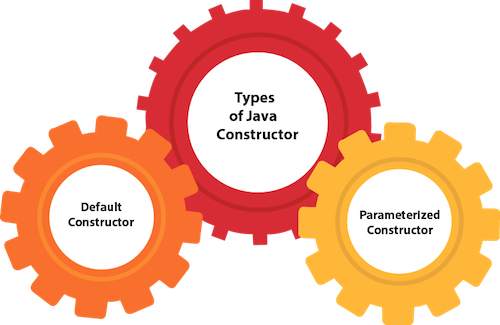
28) How many types of constructors are used in Java?
Based on the parameters passed in the constructors, there are two types of constructors in Java.
- Default Constructor: default constructor is the one which does not accept any value. The default constructor is mainly used to initialize the instance variable with the default values. It can also be used for performing some useful task on object creation. A default constructor is invoked implicitly by the compiler if there is no constructor defined in the class.
- Parameterized Constructor: The parameterized constructor is the one which can initialize the instance variables with the given values. In other words, we can say that the constructors which can accept the arguments are called parameterized constructors.
29) What is the purpose of a default constructor?The purpose of the default constructor is to assign the default value to the objects. The java compiler creates a default constructor implicitly if there is no constructor in the class. - class Student3{
- int id;
- String name;
-
- void display(){System.out.println(id+" "+name);}
-
- public static void main(String args[]){
- Student3 s1=new Student3();
- Student3 s2=new Student3();
- s1.display();
- s2.display();
- }
- }
Output: Explanation: In the above class, you are not creating any constructor, so compiler provides you a default constructor. Here 0 and null values are provided by default constructor. 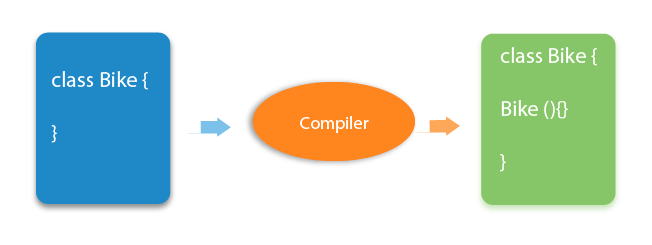
More Details.
30) Does constructor return any value?Ans: yes, The constructor implicitly returns the current instance of the class (You can't use an explicit return type with the constructor). More Details.
31)Is constructor inherited?No, The constructor is not inherited.
32) Can you make a constructor final?No, the constructor can't be final.
33) Can we overload the constructors?Yes, the constructors can be overloaded by changing the number of arguments accepted by the constructor or by changing the data type of the parameters. Consider the following example. - class Test
- {
- int i;
- public Test(int k)
- {
- i=k;
- }
- public Test(int k, int m)
- {
- System.out.println("Hi I am assigning the value max(k, m) to i");
- if(k>m)
- {
- i=k;
- }
- else
- {
- i=m;
- }
- }
- }
- public class Main
- {
- public static void main (String args[])
- {
- Test test1 = new Test(10);
- Test test2 = new Test(12, 15);
- System.out.println(test1.i);
- System.out.println(test2.i);
- }
- }
-
In the above program, The constructor Test is overloaded with another constructor. In the first call to the constructor, The constructor with one argument is called, and i will be initialized with the value 10. However, In the second call to the constructor, The constructor with the 2 arguments is called, and i will be initialized with the value 15.
34) What do you understand by copy constructor in Java?There is no copy constructor in java. However, we can copy the values from one object to another like copy constructor in C++. There are many ways to copy the values of one object into another in java. They are: - By constructor
- By assigning the values of one object into another
- By clone() method of Object class
In this example, we are going to copy the values of one object into another using java constructor. -
- class Student6{
- int id;
- String name;
-
- Student6(int i,String n){
- id = i;
- name = n;
- }
-
- Student6(Student6 s){
- id = s.id;
- name =s.name;
- }
- void display(){System.out.println(id+" "+name);}
-
- public static void main(String args[]){
- Student6 s1 = new Student6(111,"Karan");
- Student6 s2 = new Student6(s1);
- s1.display();
- s2.display();
- }
- }
Output:
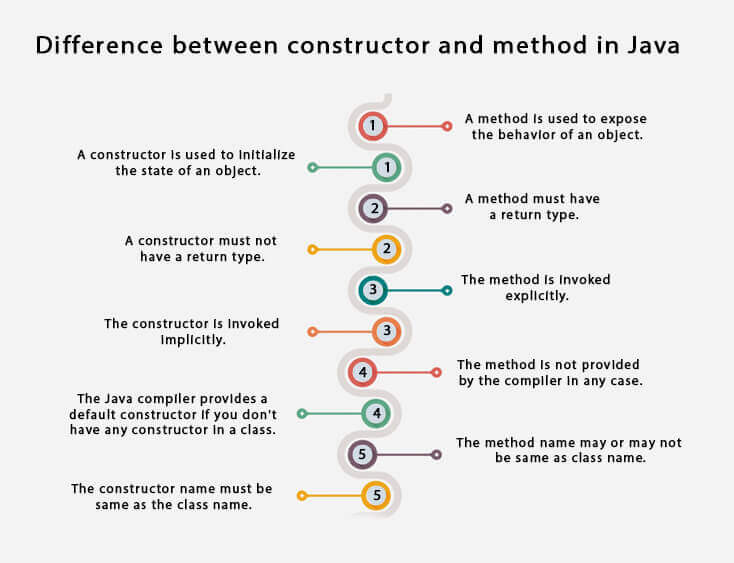
35) What are the differences between the constructors and methods?There are many differences between constructors and methods. They are given below. | Java Constructor | Java Method |
|---|
| A constructor is used to initialize the state of an object. | A method is used to expose the behavior of an object. | | A constructor must not have a return type. | A method must have a return type. | | The constructor is invoked implicitly. | The method is invoked explicitly. | | The Java compiler provides a default constructor if you don't have any constructor in a class. | The method is not provided by the compiler in any case. | | The constructor name must be same as the class name. | The method name may or may not be same as class name. |
36) What is the output of the following Java program?- public class Test
- {
- Test(int a, int b)
- {
- System.out.println("a = "+a+" b = "+b);
- }
- Test(int a, float b)
- {
- System.out.println("a = "+a+" b = "+b);
- }
- public static void main (String args[])
- {
- byte a = 10;
- byte b = 15;
- Test test = new Test(a,b);
- }
- }
The output of the following program is: Here, the data type of the variables a and b, i.e., byte gets promoted to int, and the first parameterized constructor with the two integer parameters is called.
37) What is the output of the following Java program?- class Test
- {
- int i;
- }
- public class Main
- {
- public static void main (String args[])
- {
- Test test = new Test();
- System.out.println(test.i);
- }
- }
The output of the program is 0 because the variable i is initialized to 0 internally. As we know that a default constructor is invoked implicitly if there is no constructor in the class, the variable i is initialized to 0 since there is no constructor in the class.
38) What is the output of the following Java program?- class Test
- {
- int test_a, test_b;
- Test(int a, int b)
- {
- test_a = a;
- test_b = b;
- }
- public static void main (String args[])
- {
- Test test = new Test();
- System.out.println(test.test_a+" "+test.test_b);
- }
- }
There is a compiler error in the program because there is a call to the default constructor in the main method which is not present in the class. However, there is only one parameterized constructor in the class Test. Therefore, no default constructor is invoked by the constructor implicitly.
Core Java - OOPs Concepts: static keyword Interview Questions
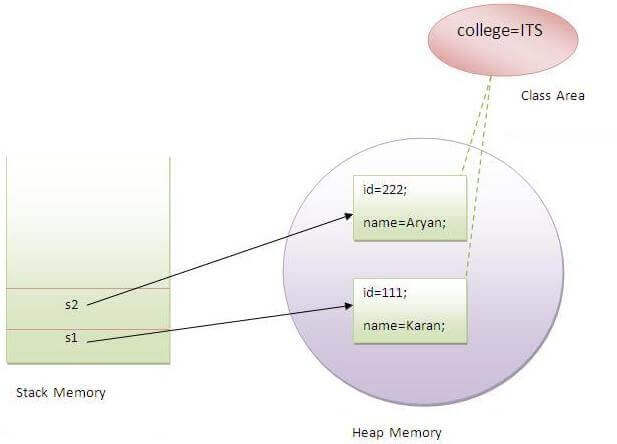
39) What is the static variable?The static variable is used to refer to the common property of all objects (that is not unique for each object), e.g., The company name of employees, college name of students, etc. Static variable gets memory only once in the class area at the time of class loading. Using a static variable makes your program more memory efficient (it saves memory). Static variable belongs to the class rather than the object. -
-
- class Student8{
- int rollno;
- String name;
- static String college ="ITS";
-
- Student8(int r,String n){
- rollno = r;
- name = n;
- }
- void display (){System.out.println(rollno+" "+name+" "+college);}
-
- public static void main(String args[]){
- Student8 s1 = new Student8(111,"Karan");
- Student8 s2 = new Student8(222,"Aryan");
-
- s1.display();
- s2.display();
- }
- }
Output:111 Karan ITS
       222 Aryan ITS
40) What is the static method?- A static method belongs to the class rather than the object.
- There is no need to create the object to call the static methods.
- A static method can access and change the value of the static variable.
41) What are the restrictions that are applied to the Java static methods?
Two main restrictions are applied to the static methods.
- The static method can not use non-static data member or call the non-static method directly.
- this and super cannot be used in static context as they are non-static.
42) Why is the main method static?Because the object is not required to call the static method. If we make the main method non-static, JVM will have to create its object first and then call main() method which will lead to the extra memory allocation. More Details.
43) Can we override the static methods?No, we can't override static methods. 44) What is the static block?Static block is used to initialize the static data member. It is executed before the main method, at the time of classloading. - class A2{
- static{System.out.println("static block is invoked");}
- public static void main(String args[]){
- System.out.println("Hello main");
- }
- }
Output: static block is invoked
       Hello main
45) Can we execute a program without main() method?Ans) No, It was possible before JDK 1.7 using the static block. Since JDK 1.7, it is not possible. More Details.
46) What if the static modifier is removed from the signature of the main method?Program compiles. However, at runtime, It throws an error "NoSuchMethodError."
47) What is the difference between static (class) method and instance method?| static or class method | instance method |
|---|
| 1)A method that is declared as static is known as the static method. | A method that is not declared as static is known as the instance method. | | 2)We don't need to create the objects to call the static methods. | The object is required to call the instance methods. | | 3)Non-static (instance) members cannot be accessed in the static context (static method, static block, and static nested class) directly. | Static and non-static variables both can be accessed in instance methods. | | 4)For example: public static int cube(int n){ return n*n*n;} | For example: public void msg(){...}. |
48) Can we make constructors static?As we know that the static context (method, block, or variable) belongs to the class, not the object. Since Constructors are invoked only when the object is created, there is no sense to make the constructors static. However, if you try to do so, the compiler will show the compiler error.
49) Can we make the abstract methods static in Java?In Java, if we make the abstract methods static, It will become the part of the class, and we can directly call it which is unnecessary. Calling an undefined method is completely useless therefore it is not allowed.
50) Can we declare the static variables and methods in an abstract class?Yes, we can declare static variables and methods in an abstract method. As we know that there is no requirement to make the object to access the static context, therefore, we can access the static context declared inside the abstract class by using the name of the abstract class. Consider the following example. - abstract class Test
- {
- static int i = 102;
- static void TestMethod()
- {
- System.out.println("hi !! I am good !!");
- }
- }
- public class TestClass extends Test
- {
- public static void main (String args[])
- {
- Test.TestMethod();
- System.out.println("i = "+Test.i);
- }
- }
Output hi !! I am good !!
i = 102
Core Java - OOPs Concepts: Inheritance Interview Questions
51) What is this keyword in java?The this keyword is a reference variable that refers to the current object. There are the various uses of this keyword in Java. It can be used to refer to current class properties such as instance methods, variable, constructors, etc. It can also be passed as an argument into the methods or constructors. It can also be returned from the method as the current class instance. 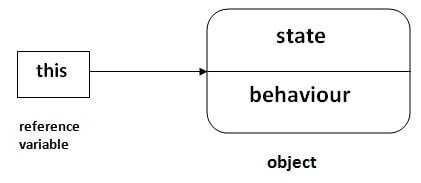
52) What are the main uses of this keyword?There are the following uses of this keyword. - this can be used to refer to the current class instance variable.
- this can be used to invoke current class method (implicitly)
- this() can be used to invoke the current class constructor.
- this can be passed as an argument in the method call.
- this can be passed as an argument in the constructor call.
- this can be used to return the current class instance from the method.
53) Can we assign the reference to this variable?No, this cannot be assigned to any value because it always points to the current class object and this is the final reference in Java. However, if we try to do so, the compiler error will be shown. Consider the following example. - public class Test
- {
- public Test()
- {
- this = null;
- System.out.println("Test class constructor called");
- }
- public static void main (String args[])
- {
- Test t = new Test();
- }
- }
Output Test.java:5: error: cannot assign a value to final variable this
this = null;
^
1 error
54) Can this keyword be used to refer static members?Yes, It is possible to use this keyword to refer static members because this is just a reference variable which refers to the current class object. However, as we know that, it is unnecessary to access static variables through objects, therefore, it is not the best practice to use this to refer static members. Consider the following example. - public class Test
- {
- static int i = 10;
- public Test ()
- {
- System.out.println(this.i);
- }
- public static void main (String args[])
- {
- Test t = new Test();
- }
- }
Output
55) How can constructor chaining be done using this keyword?Constructor chaining enables us to call one constructor from another constructor of the class with respect to the current class object. We can use this keyword to perform constructor chaining within the same class. Consider the following example which illustrates how can we use this keyword to achieve constructor chaining. - public class Employee
- {
- int id,age;
- String name, address;
- public Employee (int age)
- {
- this.age = age;
- }
- public Employee(int id, int age)
- {
- this(age);
- this.id = id;
- }
- public Employee(int id, int age, String name, String address)
- {
- this(id, age);
- this.name = name;
- this.address = address;
- }
- public static void main (String args[])
- {
- Employee emp = new Employee(105, 22, "Vikas", "Delhi");
- System.out.println("ID: "+emp.id+" Name:"+emp.name+" age:"+emp.age+" address: "+emp.address);
- }
-
- }
Output ID: 105 Name:Vikas age:22 address: Delhi
56) What are the advantages of passing this into a method instead of the current class object itself?As we know, that this refers to the current class object, therefore, it must be similar to the current class object. However, there can be two main advantages of passing this into a method instead of the current class object. - this is a final variable. Therefore, this cannot be assigned to any new value whereas the current class object might not be final and can be changed.
- this can be used in the synchronized block.
57) What is the Inheritance?Inheritance is a mechanism by which one object acquires all the properties and behavior of another object of another class. It is used for Code Reusability and Method Overriding. The idea behind inheritance in Java is that you can create new classes that are built upon existing classes. When you inherit from an existing class, you can reuse methods and fields of the parent class. Moreover, you can add new methods and fields in your current class also. Inheritance represents the IS-A relationship which is also known as a parent-child relationship. There are five types of inheritance in Java. - Single-level inheritance
- Multi-level inheritance
- Multiple Inheritance
- Hierarchical Inheritance
- Hybrid Inheritance
Multiple inheritance is not supported in Java through class.
58) Why is Inheritance used in Java?
There are various advantages of using inheritance in Java that is given below.
- Inheritance provides code reusability. The derived class does not need to redefine the method of base class unless it needs to provide the specific implementation of the method.
- Runtime polymorphism cannot be achieved without using inheritance.
- We can simulate the inheritance of classes with the real-time objects which makes OOPs more realistic.
- Inheritance provides data hiding. The base class can hide some data from the derived class by making it private.
- Method overriding cannot be achieved without inheritance. By method overriding, we can give a specific implementation of some basic method contained by the base class.
59) Which class is the superclass for all the classes?The object class is the superclass of all other classes in Java.
60) Why is multiple inheritance not supported in java?To reduce the complexity and simplify the language, multiple inheritance is not supported in java. Consider a scenario where A, B, and C are three classes. The C class inherits A and B classes. If A and B classes have the same method and you call it from child class object, there will be ambiguity to call the method of A or B class. Since the compile-time errors are better than runtime errors, Java renders compile-time error if you inherit 2 classes. So whether you have the same method or different, there will be a compile time error. - class A{
- void msg(){System.out.println("Hello");}
- }
- class B{
- void msg(){System.out.println("Welcome");}
- }
- class C extends A,B{
-
- Public Static void main(String args[]){
- C obj=new C();
- obj.msg();
- }
- }
61) What is aggregation?Aggregation can be defined as the relationship between two classes where the aggregate class contains a reference to the class it owns. Aggregation is best described as a has-a relationship. For example, The aggregate class Employee having various fields such as age, name, and salary also contains an object of Address class having various fields such as Address-Line 1, City, State, and pin-code. In other words, we can say that Employee (class) has an object of Address class. Consider the following example. Address.java - public class Address {
- String city,state,country;
-
- public Address(String city, String state, String country) {
- this.city = city;
- this.state = state;
- this.country = country;
- }
-
- }
Employee.java - public class Emp {
- int id;
- String name;
- Address address;
-
- public Emp(int id, String name,Address address) {
- this.id = id;
- this.name = name;
- this.address=address;
- }
-
- void display(){
- System.out.println(id+" "+name);
- System.out.println(address.city+" "+address.state+" "+address.country);
- }
-
- public static void main(String[] args) {
- Address address1=new Address("gzb","UP","india");
- Address address2=new Address("gno","UP","india");
-
- Emp e=new Emp(111,"varun",address1);
- Emp e2=new Emp(112,"arun",address2);
-
- e.display();
- e2.display();
-
- }
- }
Output 111 varun
gzb UP india
112 arun
gno UP india
62) What is composition?Holding the reference of a class within some other class is known as composition. When an object contains the other object, if the contained object cannot exist without the existence of container object, then it is called composition. In other words, we can say that composition is the particular case of aggregation which represents a stronger relationship between two objects. Example: A class contains students. A student cannot exist without a class. There exists composition between class and students.
63) What is the difference between aggregation and composition?Aggregation represents the weak relationship whereas composition represents the strong relationship. For example, the bike has an indicator (aggregation), but the bike has an engine (composition).
64) Why does Java not support pointers?The pointer is a variable that refers to the memory address. They are not used in Java because they are unsafe(unsecured) and complex to understand.
65) What is super in java?The super keyword in Java is a reference variable that is used to refer to the immediate parent class object. Whenever you create the instance of the subclass, an instance of the parent class is created implicitly which is referred by super reference variable. The super() is called in the class constructor implicitly by the compiler if there is no super or this. - class Animal{
- Animal(){System.out.println("animal is created");}
- }
- class Dog extends Animal{
- Dog(){
- System.out.println("dog is created");
- }
- }
- class TestSuper4{
- public static void main(String args[]){
- Dog d=new Dog();
- }
- }
Output: animal is created
dog is created
66) How can constructor chaining be done by using the super keyword?- class Person
- {
- String name,address;
- int age;
- public Person(int age, String name, String address)
- {
- this.age = age;
- this.name = name;
- this.address = address;
- }
- }
- class Employee extends Person
- {
- float salary;
- public Employee(int age, String name, String address, float salary)
- {
- super(age,name,address);
- this.salary = salary;
- }
- }
- public class Test
- {
- public static void main (String args[])
- {
- Employee e = new Employee(22, "Mukesh", "Delhi", 90000);
- System.out.println("Name: "+e.name+" Salary: "+e.salary+" Age: "+e.age+" Address: "+e.address);
- }
- }
Output Name: Mukesh Salary: 90000.0 Age: 22 Address: Delhi
67) What are the main uses of the super keyword?There are the following uses of super keyword. - super can be used to refer to the immediate parent class instance variable.
- super can be used to invoke the immediate parent class method.
- super() can be used to invoke immediate parent class constructor.
68) What are the differences between this and super keyword?There are the following differences between this and super keyword. - The super keyword always points to the parent class contexts whereas this keyword always points to the current class context.
- The super keyword is primarily used for initializing the base class variables within the derived class constructor whereas this keyword primarily used to differentiate between local and instance variables when passed in the class constructor.
- The super and this must be the first statement inside constructor otherwise the compiler will throw an error.
69) What is the output of the following Java program?- class Person
- {
- public Person()
- {
- System.out.println("Person class constructor called");
- }
- }
- public class Employee extends Person
- {
- public Employee()
- {
- System.out.println("Employee class constructor called");
- }
- public static void main (String args[])
- {
- Employee e = new Employee();
- }
- }
Output Person class constructor called
Employee class constructor called
Explanation The super() is implicitly invoked by the compiler if no super() or this() is included explicitly within the derived class constructor. Therefore, in this case, The Person class constructor is called first and then the Employee class constructor is called.
70) Can you use this() and super() both in a constructor?No, because this() and super() must be the first statement in the class constructor. Example: - public class Test{
- Test()
- {
- super();
- this();
- System.out.println("Test class object is created");
- }
- public static void main(String []args){
- Test t = new Test();
- }
- }
Output: Test.java:5: error: call to this must be first statement in constructor
71)What is object cloning?The object cloning is used to create the exact copy of an object. The clone() method of the Object class is used to clone an object. The java.lang.Cloneable interface must be implemented by the class whose object clone we want to create. If we don't implement Cloneable interface, clone() method generates CloneNotSupportedException. - protected Object clone() throws CloneNotSupportedException
-
Core Java - OOPs Concepts: Method Overloading Interview Questions
72) What is method overloading?Method overloading is the polymorphism technique which allows us to create multiple methods with the same name but different signature. We can achieve method overloading in two ways. - By Changing the number of arguments
- By Changing the data type of arguments
Method overloading increases the readability of the program. Method overloading is performed to figure out the program quickly.
73) Why is method overloading not possible by changing the return type in java?
In Java, method overloading is not possible by changing the return type of the program due to avoid the ambiguity.
- class Adder{
- static int add(int a,int b){return a+b;}
- static double add(int a,int b){return a+b;}
- }
- class TestOverloading3{
- public static void main(String[] args){
- System.out.println(Adder.add(11,11));
- }}
Output: Compile Time Error: method add(int, int) is already defined in class Adder
74) Can we overload the methods by making them static?
No, We cannot overload the methods by just applying the static keyword to them(number of parameters and types are the same). Consider the following example.
- public class Animal
- {
- void consume(int a)
- {
- System.out.println(a+" consumed!!");
- }
- static void consume(int a)
- {
- System.out.println("consumed static "+a);
- }
- public static void main (String args[])
- {
- Animal a = new Animal();
- a.consume(10);
- Animal.consume(20);
- }
- }
Output Animal.java:7: error: method consume(int) is already defined in class Animal
static void consume(int a)
^
Animal.java:15: error: non-static method consume(int) cannot be referenced from a static context
Animal.consume(20);
^
2 errors
75) Can we overload the main() method?Yes, we can have any number of main methods in a Java program by using method overloading.
76) What is method overloading with type promotion?
By Type promotion is method overloading, we mean that one data type can be promoted to another implicitly if no exact matching is found.
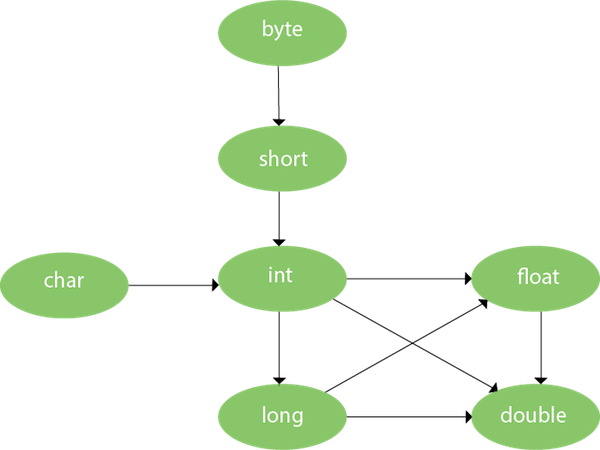 As displayed in the above diagram, the byte can be promoted to short, int, long, float or double. The short datatype can be promoted to int, long, float or double. The char datatype can be promoted to int, long, float or double and so on. Consider the following example. - class OverloadingCalculation1{
- void sum(int a,long b){System.out.println(a+b);}
- void sum(int a,int b,int c){System.out.println(a+b+c);}
-
- public static void main(String args[]){
- OverloadingCalculation1 obj=new OverloadingCalculation1();
- obj.sum(20,20);
- obj.sum(20,20,20);
- }
- }
Output
77) What is the output of the following Java program?- class OverloadingCalculation3{
- void sum(int a,long b){System.out.println("a method invoked");}
- void sum(long a,int b){System.out.println("b method invoked");}
-
- public static void main(String args[]){
- OverloadingCalculation3 obj=new OverloadingCalculation3();
- obj.sum(20,20);
- }
- }
Output OverloadingCalculation3.java:7: error: reference to sum is ambiguous
obj.sum(20,20);//now ambiguity
^
both method sum(int,long) in OverloadingCalculation3
and method sum(long,int) in OverloadingCalculation3 match
1 error
Explanation There are two methods defined with the same name, i.e., sum. The first method accepts the integer and long type whereas the second method accepts long and the integer type. The parameter passed that are a = 20, b = 20. We can not tell that which method will be called as there is no clear differentiation mentioned between integer literal and long literal. This is the case of ambiguity. Therefore, the compiler will throw an error.
Core Java - OOPs Concepts: Method Overriding Interview Questions
78) What is method overriding:If a subclass provides a specific implementation of a method that is already provided by its parent class, it is known as Method Overriding. It is used for runtime polymorphism and to implement the interface methods. Rules for Method overriding - The method must have the same name as in the parent class.
- The method must have the same signature as in the parent class.
- Two classes must have an IS-A relationship between them.
79) Can we override the static method?No, you can't override the static method because they are the part of the class, not the object.
80) Why can we not override static method?It is because the static method is the part of the class, and it is bound with class whereas instance method is bound with the object, and static gets memory in class area, and instance gets memory in a heap.
81) Can we override the overloaded method?Yes.
82) Difference between method Overloading and Overriding.| Method Overloading | Method Overriding |
|---|
| 1) Method overloading increases the readability of the program. | Method overriding provides the specific implementation of the method that is already provided by its superclass. | | 2) Method overloading occurs within the class. | Method overriding occurs in two classes that have IS-A relationship between them. | | 3) In this case, the parameters must be different. | In this case, the parameters must be the same. |
83) Can we override the private methods?No, we cannot override the private methods because the scope of private methods is limited to the class and we cannot access them outside of the class.
84) Can we change the scope of the overridden method in the subclass?Yes, we can change the scope of the overridden method in the subclass. However, we must notice that we cannot decrease the accessibility of the method. The following point must be taken care of while changing the accessibility of the method. - The private can be changed to protected, public, or default.
- The protected can be changed to public or default.
- The default can be changed to public.
- The public will always remain public.
85) Can we modify the throws clause of the superclass method while overriding it in the subclass?Yes, we can modify the throws clause of the superclass method while overriding it in the subclass. However, there are some rules which are to be followed while overriding in case of exception handling. - If the superclass method does not declare an exception, subclass overridden method cannot declare the checked exception, but it can declare the unchecked exception.
- If the superclass method declares an exception, subclass overridden method can declare same, subclass exception or no exception but cannot declare parent exception.
86) What is the output of the following Java program?- class Base
- {
- void method(int a)
- {
- System.out.println("Base class method called with integer a = "+a);
- }
-
- void method(double d)
- {
- System.out.println("Base class method called with double d ="+d);
- }
- }
-
- class Derived extends Base
- {
- @Override
- void method(double d)
- {
- System.out.println("Derived class method called with double d ="+d);
- }
- }
-
- public class Main
- {
- public static void main(String[] args)
- {
- new Derived().method(10);
- }
- }
Output Base class method called with integer a = 10
Explanation The method() is overloaded in class Base whereas it is derived in class Derived with the double type as the parameter. In the method call, the integer is passed. 87) Can you have virtual functions in Java?Yes, all functions in Java are virtual by default.
88) What is covariant return type?Now, since java5, it is possible to override any method by changing the return type if the return type of the subclass overriding method is subclass type. It is known as covariant return type. The covariant return type specifies that the return type may vary in the same direction as the subclass. - class A{
- A get(){return this;}
- }
-
- class B1 extends A{
- B1 get(){return this;}
- void message(){System.out.println("welcome to covariant return type");}
-
- public static void main(String args[]){
- new B1().get().message();
- }
- }
Output: welcome to covariant return type
89) What is the output of the following Java program?
class Base - {
- public void baseMethod()
- {
- System.out.println("BaseMethod called ...");
- }
- }
- class Derived extends Base
- {
- public void baseMethod()
- {
- System.out.println("Derived method called ...");
- }
- }
- public class Test
- {
- public static void main (String args[])
- {
- Base b = new Derived();
- b.baseMethod();
- }
- }
Output Derived method called ...
Explanation The method of Base class, i.e., baseMethod() is overridden in Derived class. In Test class, the reference variable b (of type Base class) refers to the instance of the Derived class. Here, Runtime polymorphism is achieved between class Base and Derived. At compile time, the presence of method baseMethod checked in Base class, If it presence then the program compiled otherwise the compiler error will be shown. In this case, baseMethod is present in Base class; therefore, it is compiled successfully. However, at runtime, It checks whether the baseMethod has been overridden by Derived class, if so then the Derived class method is called otherwise Base class method is called. In this case, the Derived class overrides the baseMethod; therefore, the Derived class method is called.
Core Java - OOPs Concepts: final keyword Interview Questions
90) What is the final variable?In Java, the final variable is used to restrict the user from updating it. If we initialize the final variable, we can't change its value. In other words, we can say that the final variable once assigned to a value, can never be changed after that. The final variable which is not assigned to any value can only be assigned through the class constructor. 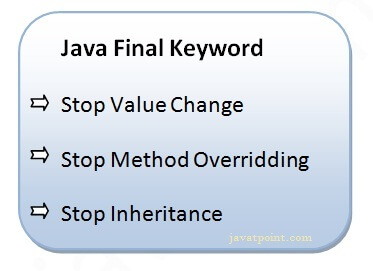 - class Bike9{
- final int speedlimit=90;
- void run(){
- speedlimit=400;
- }
- public static void main(String args[]){
- Bike9 obj=new Bike9();
- obj.run();
- }
- }
Output:Compile Time Error
91) What is the final method?
If we change any method to a final method, we can't override it.
- class Bike{
- final void run(){System.out.println("running");}
- }
-
- class Honda extends Bike{
- void run(){System.out.println("running safely with 100kmph");}
-
- public static void main(String args[]){
- Honda honda= new Honda();
- honda.run();
- }
- }
Output:Compile Time Error
92) What is the final class?If we make any class final, we can't inherit it into any of the subclasses. - final class Bike{}
-
- class Honda1 extends Bike{
- void run(){System.out.println("running safely with 100kmph");}
-
- public static void main(String args[]){
- Honda1 honda= new Honda1();
- honda.run();
- }
- }
Output:Compile Time Error
93) What is the final blank variable?
A final variable, not initialized at the time of declaration, is known as the final blank variable. We can't initialize the final blank variable directly. Instead, we have to initialize it by using the class constructor. It is useful in the case when the user has some data which must not be changed by others, for example, PAN Number. Consider the following example:
- class Student{
- int id;
- String name;
- final String PAN_CARD_NUMBER;
- ...
- }
94) Can we initialize the final blank variable?Yes, if it is not static, we can initialize it in the constructor. If it is static blank final variable, it can be initialized only in the static block.
95) Can you declare the main method as final?Yes, We can declare the main method as public static final void main(String[] args){}.
96) What is the output of the following Java program?- class Main {
- public static void main(String args[]){
- final int i;
- i = 20;
- System.out.println(i);
- }
- }
Output Explanation Since i is the blank final variable. It can be initialized only once. We have initialized it to 20. Therefore, 20 will be printed.
97) What is the output of the following Java program?- class Base
- {
- protected final void getInfo()
- {
- System.out.println("method of Base class");
- }
- }
-
- public class Derived extends Base
- {
- protected final void getInfo()
- {
- System.out.println("method of Derived class");
- }
- public static void main(String[] args)
- {
- Base obj = new Base();
- obj.getInfo();
- }
- }
Output Derived.java:11: error: getInfo() in Derived cannot override getInfo() in Base
protected final void getInfo()
^
overridden method is final
1 error
Explanation The getDetails() method is final; therefore it can not be overridden in the subclass.
98) Can we declare a constructor as final?The constructor can never be declared as final because it is never inherited. Constructors are not ordinary methods; therefore, there is no sense to declare constructors as final. However, if you try to do so, The compiler will throw an error.
99) Can we declare an interface as final?No, we cannot declare an interface as final because the interface must be implemented by some class to provide its definition. Therefore, there is no sense to make an interface final. However, if you try to do so, the compiler will show an error.
100) What is the difference between the final method and abstract method?The main difference between the final method and abstract method is that the abstract method cannot be final as we need to override them in the subclass to give its definition.
101) What is the difference between compile-time polymorphism and runtime polymorphism?There are the following differences between compile-time polymorphism and runtime polymorphism. | SN | compile-time polymorphism | Runtime polymorphism |
|---|
| 1 | In compile-time polymorphism, call to a method is resolved at compile-time. | In runtime polymorphism, call to an overridden method is resolved at runtime. | | 2 | It is also known as static binding, early binding, or overloading. | It is also known as dynamic binding, late binding, overriding, or dynamic method dispatch. | | 3 | Overloading is a way to achieve compile-time polymorphism in which, we can define multiple methods or constructors with different signatures. | Overriding is a way to achieve runtime polymorphism in which, we can redefine some particular method or variable in the derived class. By using overriding, we can give some specific implementation to the base class properties in the derived class. | | 4 | It provides fast execution because the type of an object is determined at compile-time. | It provides slower execution as compare to compile-time because the type of an object is determined at run-time. | | 5 | Compile-time polymorphism provides less flexibility because all the things are resolved at compile-time. | Run-time polymorphism provides more flexibility because all the things are resolved at runtime. |
102) What is Runtime Polymorphism?Runtime polymorphism or dynamic method dispatch is a process in which a call to an overridden method is resolved at runtime rather than at compile-time. In this process, an overridden method is called through the reference variable of a superclass. The determination of the method to be called is based on the object being referred to by the reference variable. - class Bike{
- void run(){System.out.println("running");}
- }
- class Splendor extends Bike{
- void run(){System.out.println("running safely with 60km");}
- public static void main(String args[]){
- Bike b = new Splendor();
- b.run();
- }
- }
Output: running safely with 60km.
In this process, an overridden method is called through the reference variable of a superclass. The determination of the method to be called is based on the object being referred to by the reference variable. More details.
103) Can you achieve Runtime Polymorphism by data members?No, because method overriding is used to achieve runtime polymorphism and data members cannot be overridden. We can override the member functions but not the data members. Consider the example given below. - class Bike{
- int speedlimit=90;
- }
- class Honda3 extends Bike{
- int speedlimit=150;
- public static void main(String args[]){
- Bike obj=new Honda3();
- System.out.println(obj.speedlimit);
- }
Output: More details.
104) What is the difference between static binding and dynamic binding?In case of the static binding, the type of the object is determined at compile-time whereas, in the dynamic binding, the type of the object is determined at runtime. Static Binding - class Dog{
- private void eat(){System.out.println("dog is eating...");}
-
- public static void main(String args[]){
- Dog d1=new Dog();
- d1.eat();
- }
- }
Dynamic Binding - class Animal{
- void eat(){System.out.println("animal is eating...");}
- }
-
- class Dog extends Animal{
- void eat(){System.out.println("dog is eating...");}
-
- public static void main(String args[]){
- Animal a=new Dog();
- a.eat();
- }
- }
105) What is the output of the following Java program?- class BaseTest
- {
- void print()
- {
- System.out.println("BaseTest:print() called");
- }
- }
- public class Test extends BaseTest
- {
- void print()
- {
- System.out.println("Test:print() called");
- }
- public static void main (String args[])
- {
- BaseTest b = new Test();
- b.print();
- }
- }
Output Explanation It is an example of Dynamic method dispatch. The type of reference variable b is determined at runtime. At compile-time, it is checked whether that method is present in the Base class. In this case, it is overridden in the child class, therefore, at runtime the derived class method is called.
106) What is Java instanceOf operator?The instanceof in Java is also known as type comparison operator because it compares the instance with type. It returns either true or false. If we apply the instanceof operator with any variable that has a null value, it returns false. Consider the following example. - class Simple1{
- public static void main(String args[]){
- Simple1 s=new Simple1();
- System.out.println(s instanceof Simple1);
- }
- }
Output
An object of subclass type is also a type of parent class. For example, if Dog extends Animal then object of Dog can be referred by either Dog or Animal class.
Core Java - OOPs Concepts: Abstraction Interview Questions
107) What is the abstraction?Abstraction is a process of hiding the implementation details and showing only functionality to the user. It displays just the essential things to the user and hides the internal information, for example, sending SMS where you type the text and send the message. You don't know the internal processing about the message delivery. Abstraction enables you to focus on what the object does instead of how it does it. Abstraction lets you focus on what the object does instead of how it does it. In Java, there are two ways to achieve the abstraction. More details.
108) What is the difference between abstraction and encapsulation?Abstraction hides the implementation details whereas encapsulation wraps code and data into a single unit. More details.
109) What is the abstract class?A class that is declared as abstract is known as an abstract class. It needs to be extended and its method implemented. It cannot be instantiated. It can have abstract methods, non-abstract methods, constructors, and static methods. It can also have the final methods which will force the subclass not to change the body of the method. Consider the following example. - abstract class Bike{
- abstract void run();
- }
- class Honda4 extends Bike{
- void run(){System.out.println("running safely");}
- public static void main(String args[]){
- Bike obj = new Honda4();
- obj.run();
- }
- }
Output More details.
110) Can there be an abstract method without an abstract class?No, if there is an abstract method in a class, that class must be abstract.
111) Is the following program written correctly? If yes then what will be the output of the program?- abstract class Calculate
- {
- abstract int multiply(int a, int b);
- }
-
- public class Main
- {
- public static void main(String[] args)
- {
- int result = new Calculate()
- {
- @Override
- int multiply(int a, int b)
- {
- return a*b;
- }
- }.multiply(12,32);
- System.out.println("result = "+result);
- }
- }
Yes, the program is written correctly. The Main class provides the definition of abstract method multiply declared in abstract class Calculation. The output of the program will be: Output
112) Can you use abstract and final both with a method?No, because we need to override the abstract method to provide its implementation, whereas we can't override the final method.
113) Is it possible to instantiate the abstract class?No, the abstract class can never be instantiated even if it contains a constructor and all of its methods are implemented.
114) What is the interface?The interface is a blueprint for a class that has static constants and abstract methods. It can be used to achieve full abstraction and multiple inheritance. It is a mechanism to achieve abstraction. There can be only abstract methods in the Java interface, not method body. It is used to achieve abstraction and multiple inheritance in Java. In other words, you can say that interfaces can have abstract methods and variables. Java Interface also represents the IS-A relationship. It cannot be instantiated just like the abstract class. However, we need to implement it to define its methods. Since Java 8, we can have the default, static, and private methods in an interface. More details.
115) Can you declare an interface method static?No, because methods of an interface are abstract by default, and we can not use static and abstract together.
116) Can the Interface be final?No, because an interface needs to be implemented by the other class and if it is final, it can't be implemented by any class.
117) What is a marker interface?A Marker interface can be defined as the interface which has no data member and member functions. For example, Serializable, Cloneable are marker interfaces. The marker interface can be declared as follows. - public interface Serializable{
- }
118) What are the differences between abstract class and interface?| Abstract class | Interface |
|---|
| An abstract class can have a method body (non-abstract methods). | The interface has only abstract methods. | | An abstract class can have instance variables. | An interface cannot have instance variables. | | An abstract class can have the constructor. | The interface cannot have the constructor. | | An abstract class can have static methods. | The interface cannot have static methods. | | You can extend one abstract class. | You can implement multiple interfaces. | | The abstract class can provide the implementation of the interface. | The Interface can't provide the implementation of the abstract class. | | The abstract keyword is used to declare an abstract class. | The interface keyword is used to declare an interface. | | An abstract class can extend another Java class and implement multiple Java interfaces. | An interface can extend another Java interface only. | | An abstract class can be extended using keyword extends | An interface class can be implemented using keyword implements | | A Java abstract class can have class members like private, protected, etc. | Members of a Java interface are public by default. | Example:
public abstract class Shape{
public abstract void draw();
} | Example:
public interface Drawable{
void draw();
} |
119) Can we define private and protected modifiers for the members in interfaces?No, they are implicitly public.
120) When can an object reference be cast to an interface reference?An object reference can be cast to an interface reference when the object implements the referenced interface.
121) How to make a read-only class in Java?A class can be made read-only by making all of the fields private. The read-only class will have only getter methods which return the private property of the class to the main method. We cannot modify this property because there is no setter method available in the class. Consider the following example. -
- public class Student{
-
- private String college="AKG";
-
- public String getCollege(){
- return college;
- }
- }
122) How to make a write-only class in Java?A class can be made write-only by making all of the fields private. The write-only class will have only setter methods which set the value passed from the main method to the private fields. We cannot read the properties of the class because there is no getter method in this class. Consider the following example. -
- public class Student{
-
- private String college;
-
- public void setCollege(String college){
- this.college=college;
- }
- }
123) What are the advantages of Encapsulation in Java?There are the following advantages of Encapsulation in Java? - By providing only the setter or getter method, you can make the class read-only or write-only. In other words, you can skip the getter or setter methods.
- It provides you the control over the data. Suppose you want to set the value of id which should be greater than 100 only, you can write the logic inside the setter method. You can write the logic not to store the negative numbers in the setter methods.
- It is a way to achieve data hiding in Java because other class will not be able to access the data through the private data members.
- The encapsulate class is easy to test. So, it is better for unit testing.
- The standard IDE's are providing the facility to generate the getters and setters. So, it is easy and fast to create an encapsulated class in Java.
Core Java - OOPs Concepts: Package Interview Questions
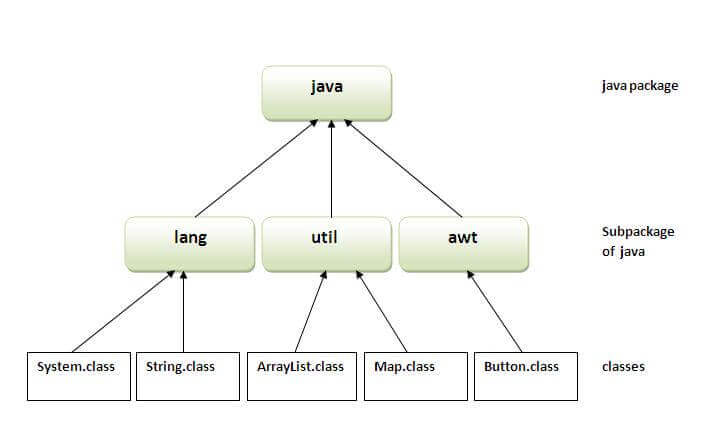
124) What is the package?A package is a group of similar type of classes, interfaces, and sub-packages. It provides access protection and removes naming collision. The packages in Java can be categorized into two forms, inbuilt package, and user-defined package. There are many built-in packages such as Java, lang, awt, javax, swing, net, io, util, sql, etc. Consider the following example to create a package in Java. -
- package mypack;
- public class Simple{
- public static void main(String args[]){
- System.out.println("Welcome to package");
- }
- }
More details.
125) What are the advantages of defining packages in Java?By defining packages, we can avoid the name conflicts between the same class names defined in different packages. Packages also enable the developer to organize the similar classes more effectively. For example, one can clearly understand that the classes present in java.io package are used to perform io related operations.
126) How to create packages in Java?If you are using the programming IDEs like Eclipse, NetBeans, MyEclipse, etc. click on file->new->project and eclipse will ask you to enter the name of the package. It will create the project package containing various directories such as src, etc. If you are using an editor like notepad for java programming, use the following steps to create the package.
127) How can we access some class in another class in Java?There are two ways to access a class in another class. - By using the fully qualified name: To access a class in a different package, either we must use the fully qualified name of that class, or we must import the package containing that class.
- By using the relative path, We can use the path of the class that is related to the package that contains our class. It can be the same or subpackage.
128) Do I need to import java.lang package any time? Why?No. It is by default loaded internally by the JVM.
129) Can I import same package/class twice? Will the JVM load the package twice at runtime?One can import the same package or the same class multiple times. Neither compiler nor JVM complains about it. However, the JVM will internally load the class only once no matter how many times you import the same class.
130) What is the static import?By static import, we can access the static members of a class directly, and there is no to qualify it with the class name. More details.
Java: Exception Handling Interview QuestionsThere is given a list of exception handling interview questions with answers. If you know any exception handling interview question, kindly post it in the comment section.
131) How many types of exception can occur in a Java program?There are mainly two types of exceptions: checked and unchecked. Here, an error is considered as the unchecked exception. According to Oracle, there are three types of exceptions: - Checked Exception: Checked exceptions are the one which are checked at compile-time. For example, SQLException, ClassNotFoundException, etc.
- Unchecked Exception: Unchecked exceptions are the one which are handled at runtime because they can not be checked at compile-time. For example, ArithmaticException, NullPointerException, ArrayIndexOutOfBoundsException, etc.
- Error: Error cause the program to exit since they are not recoverable. For Example, OutOfMemoryError, AssertionError, etc.
132) What is Exception Handling?Exception Handling is a mechanism that is used to handle runtime errors. It is used primarily to handle checked exceptions. Exception handling maintains the normal flow of the program. There are mainly two types of exceptions: checked and unchecked. Here, the error is considered as the unchecked exception. More details.
133) Explain the hierarchy of Java Exception classes?The java.lang.Throwable class is the root class of Java Exception hierarchy which is inherited by two subclasses: Exception and Error. A hierarchy of Java Exception classes are given below: 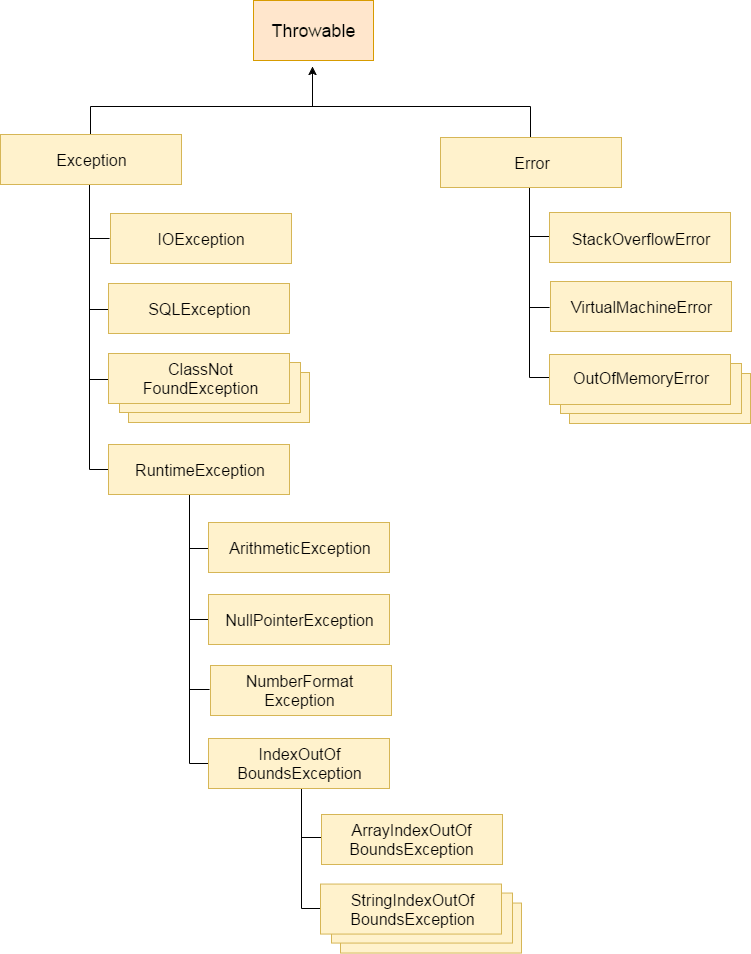
134) What is the difference between Checked Exception and Unchecked Exception?1) Checked ExceptionThe classes that extend Throwable class except RuntimeException and Error are known as checked exceptions, e.g., IOException, SQLException, etc. Checked exceptions are checked at compile-time. 2) Unchecked ExceptionThe classes that extend RuntimeException are known as unchecked exceptions, e.g., ArithmeticException, NullPointerException, etc. Unchecked exceptions are not checked at compile-time. More details.
135) What is the base class for Error and Exception?The Throwable class is the base class for Error and Exception.
136) Is it necessary that each try block must be followed by a catch block?It is not necessary that each try block must be followed by a catch block. It should be followed by either a catch block OR a finally block. So whatever exceptions are likely to be thrown should be declared in the throws clause of the method. Consider the following example. - public class Main{
- public static void main(String []args){
- try{
- int a = 1;
- System.out.println(a/0);
- }
- finally
- {
- System.out.println("rest of the code...");
- }
- }
- }
-
Output: Exception in thread main java.lang.ArithmeticException:/ by zero
rest of the code...
137) What is the output of the following Java program?- public class ExceptionHandlingExample {
- public static void main(String args[])
- {
- try
- {
- int a = 1/0;
- System.out.println("a = "+a);
- }
- catch(Exception e){System.out.println(e);}
- catch(ArithmeticException ex){System.out.println(ex);}
- }
- }
Output ExceptionHandlingExample.java:10: error: exception ArithmeticException has already been caught
catch(ArithmeticException ex){System.out.println(ex);}
^
1 error
Explanation ArithmaticException is the subclass of Exception. Therefore, it can not be used after Exception. Since Exception is the base class for all the exceptions, therefore, it must be used at last to handle the exception. No class can be used after this.
138) What is finally block?The "finally" block is used to execute the important code of the program. It is executed whether an exception is handled or not. In other words, we can say that finally block is the block which is always executed. Finally block follows try or catch block. If you don't handle the exception, before terminating the program, JVM runs finally block, (if any). The finally block is mainly used to place the cleanup code such as closing a file or closing a connection. Here, we must know that for each try block there can be zero or more catch blocks, but only one finally block. The finally block will not be executed if program exits(either by calling System.exit() or by causing a fatal error that causes the process to abort). 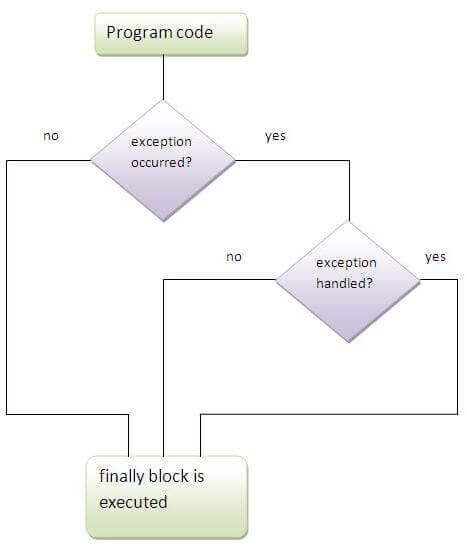
More details.
139) Can finally block be used without a catch?Yes, According to the definition of finally block, it must be followed by a try or catch block, therefore, we can use try block instead of catch. More details.
140) Is there any case when finally will not be executed?Finally block will not be executed if program exits(either by calling System.exit() or by causing a fatal error that causes the process to abort).More details.
141) What is the difference between throw and throws?| throw keyword | throws keyword |
|---|
| 1) The throw keyword is used to throw an exception explicitly. | The throws keyword is used to declare an exception. | | 2) The checked exceptions cannot be propagated with throw only. | The checked exception can be propagated with throws | | 3) The throw keyword is followed by an instance. | The throws keyword is followed by class. | | 4) The throw keyword is used within the method. | The throws keyword is used with the method signature. | | 5) You cannot throw multiple exceptions. | You can declare multiple exceptions, e.g., public void method()throws IOException, SQLException. |
More details.
142) What is the output of the following Java program?- public class Main{
- public static void main(String []args){
- try
- {
- throw 90;
- }
- catch(int e){
- System.out.println("Caught the exception "+e);
- }
-
- }
- }
Output Main.java:6: error: incompatible types: int cannot be converted to Throwable
throw 90;
^
Main.java:8: error: unexpected type
catch(int e){
^
required: class
found: int
2 errors
Explanation In Java, the throwable objects can only be thrown. If we try to throw an integer object, The compiler will show an error since we can not throw basic data type from a block of code.
143) What is the output of the following Java program?- class Calculation extends Exception
- {
- public Calculation()
- {
- System.out.println("Calculation class is instantiated");
- }
- public void add(int a, int b)
- {
- System.out.println("The sum is "+(a+b));
- }
- }
- public class Main{
- public static void main(String []args){
- try
- {
- throw new Calculation();
- }
- catch(Calculation c){
- c.add(10,20);
- }
- }
- }
Output Calculation class is instantiated
The sum is 30
Explanation The object of Calculation is thrown from the try block which is caught in the catch block. The add() of Calculation class is called with the integer values 10 and 20 by using the object of this class. Therefore there sum 30 is printed. The object of the Main class can only be thrown in the case when the type of the object is throwable. To do so, we need to extend the throwable class.
144) Can an exception be rethrown?Yes.
145) Can subclass overriding method declare an exception if parent class method doesn't throw an exception?Yes but only unchecked exception not checked. More details.
146) What is exception propagation?An exception is first thrown from the top of the stack and if it is not caught, it drops down the call stack to the previous method, If not caught there, the exception again drops down to the previous method, and so on until they are caught or until they reach the very bottom of the call stack. This procedure is called exception propagation. By default, checked exceptions are not propagated. - class TestExceptionPropagation1{
- void m(){
- int data=50/0;
- }
- void n(){
- m();
- }
- void p(){
- try{
- n();
- }catch(Exception e){System.out.println("exception handled");}
- }
- public static void main(String args[]){
- TestExceptionPropagation1 obj=new TestExceptionPropagation1();
- obj.p();
- System.out.println("normal flow...");
- }
- }
Output: exception handled
normal flow...
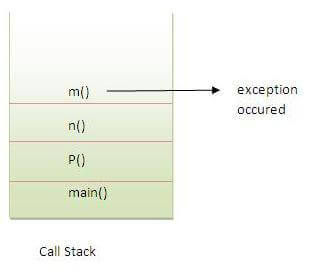
More details.
147) What is the output of the following Java program?- public class Main
- {
- void a()
- {
- try{
- System.out.println("a(): Main called");
- b();
- }catch(Exception e)
- {
- System.out.println("Exception is caught");
- }
- }
- void b() throws Exception
- {
- try{
- System.out.println("b(): Main called");
- c();
- }catch(Exception e){
- throw new Exception();
- }
- finally
- {
- System.out.println("finally block is called");
- }
- }
- void c() throws Exception
- {
- throw new Exception();
- }
-
- public static void main (String args[])
- {
- Main m = new Main();
- m.a();
- }
- }
Output a(): Main called
b(): Main called
finally block is called
Exception is caught
Explanation In the main method, a() of Main is called which prints a message and call b(). The method b() prints some message and then call c(). The method c() throws an exception which is handled by the catch block of method b. However, It propagates this exception by using throw Exception() to be handled by the method a(). As we know, finally block is always executed therefore the finally block in the method b() is executed first and prints a message. At last, the exception is handled by the catch block of the method a().
148) What is the output of the following Java program?- public class Calculation
- {
- int a;
- public Calculation(int a)
- {
- this.a = a;
- }
- public int add()
- {
- a = a+10;
- try
- {
- a = a+10;
- try
- {
- a = a*10;
- throw new Exception();
- }catch(Exception e){
- a = a - 10;
- }
- }catch(Exception e)
- {
- a = a - 10;
- }
- return a;
- }
-
- public static void main (String args[])
- {
- Calculation c = new Calculation(10);
- int result = c.add();
- System.out.println("result = "+result);
- }
- }
Output Explanation The instance variable a of class Calculation is initialized to 10 using the class constructor which is called while instantiating the class. The add method is called which returns an integer value result. In add() method, a is incremented by 10 to be 20. Then, in the first try block, 10 is again incremented by 10 to be 30. In the second try block, a is multiplied by 10 to be 300. The second try block throws the exception which is caught by the catch block associated with this try block. The catch block again alters the value of a by decrementing it by 10 to make it 290. Thus the add() method returns 290 which is assigned to result. However, the catch block associated with the outermost try block will never be executed since there is no exception which can be handled by this catch block.
Java: String Handling Interview QuestionsThere is given a list of string handling interview questions with short and pointed answers. If you know any string handling interview question, kindly post it in the comment section.
149) What is String Pool?String pool is the space reserved in the heap memory that can be used to store the strings. The main advantage of using the String pool is whenever we create a string literal; the JVM checks the "string constant pool" first. If the string already exists in the pool, a reference to the pooled instance is returned. If the string doesn't exist in the pool, a new string instance is created and placed in the pool. Therefore, it saves the memory by avoiding the duplicacy. 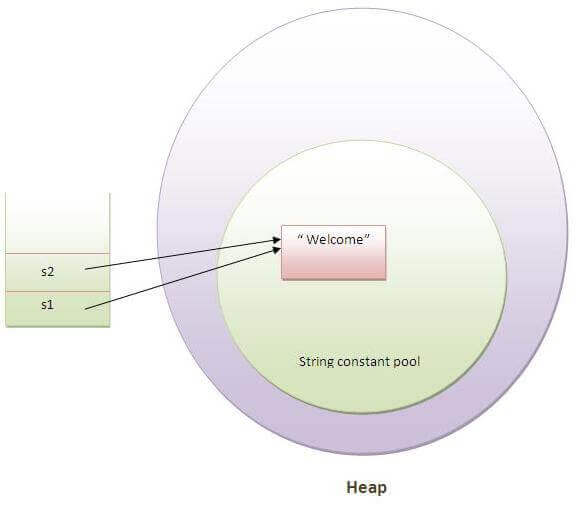
150) What is the meaning of immutable regarding String?The simple meaning of immutable is unmodifiable or unchangeable. In Java, String is immutable, i.e., once string object has been created, its value can't be changed. Consider the following example for better understanding. - class Testimmutablestring{
- public static void main(String args[]){
- String s="Sachin";
- s.concat(" Tendulkar");
- System.out.println(s);
- }
- }
Output: More details.
151) Why are the objects immutable in java?Because Java uses the concept of the string literal. Suppose there are five reference variables, all refer to one object "sachin". If one reference variable changes the value of the object, it will be affected by all the reference variables. That is why string objects are immutable in java. 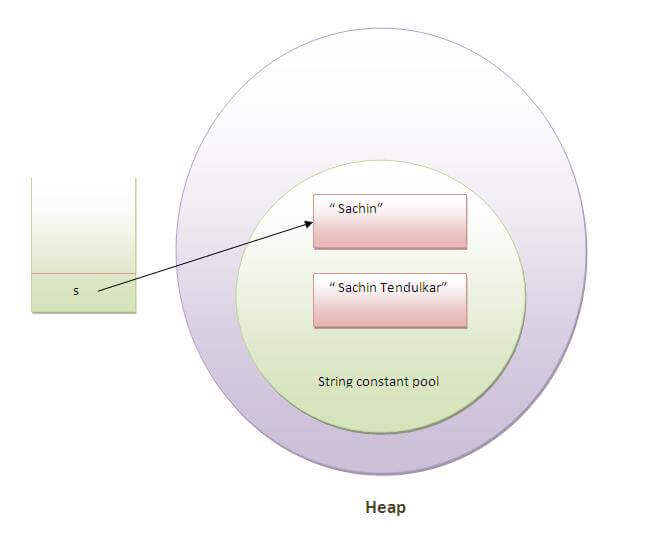
More details.
152) How many ways can we create the string object?1) String LiteralJava String literal is created by using double quotes. For Example: Each time you create a string literal, the JVM checks the "string constant pool" first. If the string already exists in the pool, a reference to the pooled instance is returned. If the string doesn't exist in the pool, a new string instance is created and placed in the pool. String objects are stored in a special memory area known as the string constant pool For example: - String s1="Welcome";
- String s2="Welcome";
2) By new keyword- String s=new String("Welcome");
In such case, JVM will create a new string object in normal (non-pool) heap memory, and the literal "Welcome" will be placed in the constant string pool. The variable s will refer to the object in a heap (non-pool).
153) How many objects will be created in the following code?- String s1="Welcome";
- String s2="Welcome";
- String s3="Welcome";
Only one object will be created using the above code because strings in Java are immutable. More details.
154) Why java uses the concept of the string literal?To make Java more memory efficient (because no new objects are created if it exists already in the string constant pool). More details.
155) How many objects will be created in the following code?- String s = new String("Welcome");
Two objects, one in string constant pool and other in non-pool(heap). More details.
156) What is the output of the following Java program?- public class Test
-
- public static void main (String args[])
- {
- String a = new String("Sharma is a good player");
- String b = "Sharma is a good player";
- if(a == b)
- {
- System.out.println("a == b");
- }
- if(a.equals(b))
- {
- System.out.println("a equals b");
- }
- }
Output Explanation The operator == also check whether the references of the two string objects are equal or not. Although both of the strings contain the same content, their references are not equal because both are created by different ways(Constructor and String literal) therefore, a == b is unequal. On the other hand, the equal() method always check for the content. Since their content is equal hence, a equals b is printed.
157) What is the output of the following Java program?- public class Test
- {
- public static void main (String args[])
- {
- String s1 = "Sharma is a good player";
- String s2 = new String("Sharma is a good player");
- s2 = s2.intern();
- System.out.println(s1 ==s2);
- }
- }
Output Explanation The intern method returns the String object reference from the string pool. In this case, s1 is created by using string literal whereas, s2 is created by using the String pool. However, s2 is changed to the reference of s1, and the operator == returns true.
158) What are the differences between String and StringBuffer?The differences between the String and StringBuffer is given in the table below. | No. | String | StringBuffer |
|---|
| 1) | The String class is immutable. | The StringBuffer class is mutable. | | 2) | The String is slow and consumes more memory when you concat too many strings because every time it creates a new instance. | The StringBuffer is fast and consumes less memory when you cancat strings. | | 3) | The String class overrides the equals() method of Object class. So you can compare the contents of two strings by equals() method. | The StringBuffer class doesn't override the equals() method of Object class. |
159) What are the differences between StringBuffer and StringBuilder?The differences between the StringBuffer and StringBuilder is given below. | No. | StringBuffer | StringBuilder |
|---|
| 1) | StringBuffer is synchronized, i.e., thread safe. It means two threads can't call the methods of StringBuffer simultaneously. | StringBuilder is non-synchronized,i.e., not thread safe. It means two threads can call the methods of StringBuilder simultaneously. | | 2) | StringBuffer is less efficient than StringBuilder. | StringBuilder is more efficient than StringBuffer. |
160) How can we create an immutable class in Java?We can create an immutable class by defining a final class having all of its members as final. Consider the following example. - public final class Employee{
- final String pancardNumber;
-
- public Employee(String pancardNumber){
- this.pancardNumber=pancardNumber;
- }
-
- public String getPancardNumber(){
- return pancardNumber;
- }
-
- }
161) What is the purpose of toString() method in Java?The toString() method returns the string representation of an object. If you print any object, java compiler internally invokes the toString() method on the object. So overriding the toString() method, returns the desired output, it can be the state of an object, etc. depending upon your implementation. By overriding the toString() method of the Object class, we can return the values of the object, so we don't need to write much code. Consider the following example. - class Student{
- int rollno;
- String name;
- String city;
-
- Student(int rollno, String name, String city){
- this.rollno=rollno;
- this.name=name;
- this.city=city;
- }
-
- public String toString(){
- return rollno+" "+name+" "+city;
- }
- public static void main(String args[]){
- Student s1=new Student(101,"Raj","lucknow");
- Student s2=new Student(102,"Vijay","ghaziabad");
-
- System.out.println(s1);
- System.out.println(s2);
- }
- }
Output: 101 Raj lucknow
102 Vijay ghaziabad
162) Why CharArray() is preferred over String to store the password?String stays in the string pool until the garbage is collected. If we store the password into a string, it stays in the memory for a longer period, and anyone having the memory-dump can extract the password as clear text. On the other hand, Using CharArray allows us to set it to blank whenever we are done with the password. It avoids the security threat with the string by enabling us to control the memory.
163) Write a Java program to count the number of words present in a string?Program: - public class Test
- {
- public static void main (String args[])
- {
- String s = "Sharma is a good player and he is so punctual";
- String words[] = s.split(" ");
- System.out.println("The Number of words present in the string are : "+words.length);
- }
- }
Output The Number of words present in the string are : 10
164) Name some classes present in java.util.regex package.There are the following classes and interfaces present in java.util.regex package. - MatchResult Interface
- Matcher class
- Pattern class
- PatternSyntaxException class
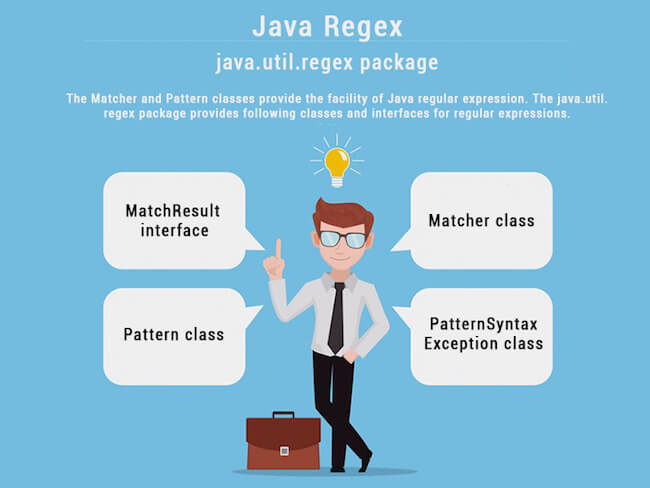
165) How the metacharacters are different from the ordinary characters?Metacharacters have the special meaning to the regular expression engine. The metacharacters are ^, $, ., *, +, etc. The regular expression engine does not consider them as the regular characters. To enable the regular expression engine treating the metacharacters as ordinary characters, we need to escape the metacharacters with the backslash.
166) Write a regular expression to validate a password. A password must start with an alphabet and followed by alphanumeric characters; Its length must be in between 8 to 20.The regular expression for the above criteria will be: ^[a-zA-Z][a-zA-Z0-9]{8,19} where ^ represents the start of the regex, [a-zA-Z] represents that the first character must be an alphabet, [a-zA-Z0-9] represents the alphanumeric character, {8,19} represents that the length of the password must be in between 8 and 20.
167) What is the output of the following Java program?- import java.util.regex.*;
- class RegexExample2{
- public static void main(String args[]){
- System.out.println(Pattern.matches(".s", "as"));
- System.out.println(Pattern.matches(".s", "mk"));
- System.out.println(Pattern.matches(".s", "mst"));
- System.out.println(Pattern.matches(".s", "amms"));
- System.out.println(Pattern.matches("..s", "mas"));
- }}
Output true
false
false
false
true
Explanation line 4 prints true since the second character of string is s, line 5 prints false since the second character is not s, line 6 prints false since there are more than 3 characters in the string, line 7 prints false since there are more than 2 characters in the string, and it contains more than 2 characters as well, line 8 prints true since the third character of the string is s.
Core Java: Nested classes and Interfaces Interview Questions
168) What are the advantages of Java inner classes?There are two types of advantages of Java inner classes. - Nested classes represent a special type of relationship that is it can access all the members (data members and methods) of the outer class including private.
- Nested classes are used to develop a more readable and maintainable code because it logically groups classes and interfaces in one place only.
- Code Optimization: It requires less code to write.
169) What is a nested class?The nested class can be defined as the class which is defined inside another class or interface. We use the nested class to logically group classes and interfaces in one place so that it can be more readable and maintainable. A nested class can access all the data members of the outer class including private data members and methods. The syntax of the nested class is defined below. - class Java_Outer_class{
-
- class Java_Nested_class{
-
- }
- }
-
There are two types of nested classes, static nested class, and non-static nested class. The non-static nested class can also be called as inner-class More details.
170) What are the disadvantages of using inner classes?There are the following main disadvantages of using inner classes. - Inner classes increase the total number of classes used by the developer and therefore increases the workload of JVM since it has to perform some routine operations for those extra classes which result in slower performance.
- IDEs provide less support to the inner classes as compare to the top level classes and therefore it annoys the developers while working with inner classes.
171) What are the types of inner classes (non-static nested class) used in Java?There are mainly three types of inner classes used in Java.
172) Is there any difference between nested classes and inner classes?Yes, inner classes are non-static nested classes. In other words, we can say that inner classes are the part of nested classes. More details.
173) Can we access the non-final local variable, inside the local inner class?No, the local variable must be constant if you want to access it in the local inner class. More details.
174) How many class files are created on compiling the OuterClass in the following program?- public class Person {
- String name, age, address;
- class Employee{
- float salary=10000;
- }
- class BusinessMen{
- final String gstin="£4433drt3$";
- }
- public static void main (String args[])
- {
- Person p = new Person();
- }
- }
3 class-files will be created named as Person.class, Person$BusinessMen.class, and Person$Employee.class.
175) What are anonymous inner classes?Anonymous inner classes are the classes that are automatically declared and instantiated within an expression. We cannot apply different access modifiers to them. Anonymous class cannot be static, and cannot define any static fields, method, or class. In other words, we can say that it a class without the name and can have only one object that is created by its definition. Consider the following example. - abstract class Person{
- abstract void eat();
- }
- class TestAnonymousInner{
- public static void main(String args[]){
- Person p=new Person(){
- void eat(){System.out.println("nice fruits");}
- };
- p.eat();
- }
- }
Output: Consider the following example for the working of the anonymous class using interface. - interface Eatable{
- void eat();
- }
- class TestAnnonymousInner1{
- public static void main(String args[]){
- Eatable e=new Eatable(){
- public void eat(){System.out.println("nice fruits");}
- };
- e.eat();
- }
- }
Output:
176) What is the nested interface?An Interface that is declared inside the interface or class is known as the nested interface. It is static by default. The nested interfaces are used to group related interfaces so that they can be easy to maintain. The external interface or class must refer to the nested interface. It can't be accessed directly. The nested interface must be public if it is declared inside the interface but it can have any access modifier if declared within the class. The syntax of the nested interface is given as follows. - interface interface_name{
- ...
- interface nested_interface_name{
- ...
- }
- }
-
177) Can a class have an interface?
Yes, an interface can be defined within the class. It is called a nested interface.
178) Can an Interface have a class?
Yes, they are static implicitly.
More details.Garbage Collection Interview Questions
179) What is Garbage Collection?Garbage collection is a process of reclaiming the unused runtime objects. It is performed for memory management. In other words, we can say that It is the process of removing unused objects from the memory to free up space and make this space available for Java Virtual Machine. Due to garbage collection java gives 0 as output to a variable whose value is not set, i.e., the variable has been defined but not initialized. For this purpose, we were using free() function in the C language and delete() in C++. In Java, it is performed automatically. So, java provides better memory management. More details.
180) What is gc()?The gc() method is used to invoke the garbage collector for cleanup processing. This method is found in System and Runtime classes. This function explicitly makes the Java Virtual Machine free up the space occupied by the unused objects so that it can be utilized or reused. Consider the following example for the better understanding of how the gc() method invoke the garbage collector. - public class TestGarbage1{
- public void finalize(){System.out.println("object is garbage collected");}
- public static void main(String args[]){
- TestGarbage1 s1=new TestGarbage1();
- TestGarbage1 s2=new TestGarbage1();
- s1=null;
- s2=null;
- System.gc();
- }
- }
       object is garbage collected
       object is garbage collected
181) How is garbage collection controlled?Garbage collection is managed by JVM. It is performed when there is not enough space in the memory and memory is running low. We can externally call the System.gc() for the garbage collection. However, it depends upon the JVM whether to perform it or not.
182) How can an object be unreferenced?There are many ways: - By nulling the reference
- By assigning a reference to another
- By anonymous object etc.
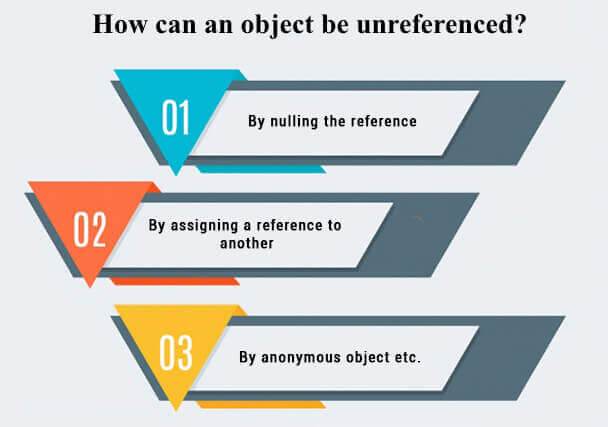 1) By nulling a reference:- Employee e=new Employee();
- e=null;
2) By assigning a reference to another:- Employee e1=new Employee();
- Employee e2=new Employee();
- e1=e2;
3) By anonymous object:
183) What is the purpose of the finalize() method?The finalize() method is invoked just before the object is garbage collected. It is used to perform cleanup processing. The Garbage collector of JVM collects only those objects that are created by new keyword. So if you have created an object without new, you can use the finalize method to perform cleanup processing (destroying remaining objects). The cleanup processing is the process to free up all the resources, network which was previously used and no longer needed. It is essential to remember that it is not a reserved keyword, finalize method is present in the object class hence it is available in every class as object class is the superclass of every class in java. Here, we must note that neither finalization nor garbage collection is guaranteed. Consider the following example. - public class FinalizeTest {
- int j=12;
- void add()
- {
- j=j+12;
- System.out.println("J="+j);
- }
- public void finalize()
- {
- System.out.println("Object is garbage collected");
- }
- public static void main(String[] args) {
- new FinalizeTest().add();
- System.gc();
- new FinalizeTest().add();
- }
- }
-
184) Can an unreferenced object be referenced again?Yes,
185) What kind of thread is the Garbage collector thread?Daemon thread.
186) What is the difference between final, finally and finalize?| No. | final | finally | finalize |
|---|
| 1) | Final is used to apply restrictions on class, method, and variable. The final class can't be inherited, final method can't be overridden, and final variable value can't be changed. | Finally is used to place important code, it will be executed whether an exception is handled or not. | Finalize is used to perform clean up processing just before an object is garbage collected. | | 2) | Final is a keyword. | Finally is a block. | Finalize is a method. |
187) What is the purpose of the Runtime class?Java Runtime class is used to interact with a java runtime environment. Java Runtime class provides methods to execute a process, invoke GC, get total and free memory, etc. There is only one instance of java.lang.Runtime class is available for one java application. The Runtime.getRuntime() method returns the singleton instance of Runtime class.
188) How will you invoke any external process in Java?By Runtime.getRuntime().exec(?) method. Consider the following example. - public class Runtime1{
- public static void main(String args[])throws Exception{
- Runtime.getRuntime().exec("notepad");
- }
- }
I/O Interview Questions
189) Give the hierarchy of InputStream and OutputStream classes.OutputStream Hierarchy  InputStream Hierarchy 
190) What do you understand by an IO stream?The stream is a sequence of data that flows from source to destination. It is composed of bytes. In Java, three streams are created for us automatically. - System.out: standard output stream
- System.in: standard input stream
- System.err: standard error stream
191) What is the difference between the Reader/Writer class hierarchy and the InputStream/OutputStream class hierarchy?The Reader/Writer class hierarchy is character-oriented, and the InputStream/OutputStream class hierarchy is byte-oriented. The ByteStream classes are used to perform input-output of 8-bit bytes whereas the CharacterStream classes are used to perform the input/output for the 16-bit Unicode system. There are many classes in the ByteStream class hierarchy, but the most frequently used classes are FileInputStream and FileOutputStream. The most frequently used classes CharacterStream class hierarchy is FileReader and FileWriter.
192) What are the super most classes for all the streams?All the stream classes can be divided into two types of classes that are ByteStream classes and CharacterStream Classes. The ByteStream classes are further divided into InputStream classes and OutputStream classes. CharacterStream classes are also divided into Reader classes and Writer classes. The SuperMost classes for all the InputStream classes is java.io.InputStream and for all the output stream classes is java.io.OutPutStream. Similarly, for all the reader classes, the super-most class is java.io.Reader, and for all the writer classes, it is java.io.Writer.
193) What are the FileInputStream and FileOutputStream?Java FileOutputStream is an output stream used for writing data to a file. If you have some primitive values to write into a file, use FileOutputStream class. You can write byte-oriented as well as character-oriented data through the FileOutputStream class. However, for character-oriented data, it is preferred to use FileWriter than FileOutputStream. Consider the following example of writing a byte into a file. - import java.io.FileOutputStream;
- public class FileOutputStreamExample {
- public static void main(String args[]){
- try{
- FileOutputStream fout=new FileOutputStream("D:\\testout.txt");
- fout.write(65);
- fout.close();
- System.out.println("success...");
- }catch(Exception e){System.out.println(e);}
- }
- }
Java FileInputStream class obtains input bytes from a file. It is used for reading byte-oriented data (streams of raw bytes) such as image data, audio, video, etc. You can also read character-stream data. However, for reading streams of characters, it is recommended to use FileReader class. Consider the following example for reading bytes from a file. - import java.io.FileInputStream;
- public class DataStreamExample {
- public static void main(String args[]){
- try{
- FileInputStream fin=new FileInputStream("D:\\testout.txt");
- int i=fin.read();
- System.out.print((char)i);
-
- fin.close();
- }catch(Exception e){System.out.println(e);}
- }
- }
-
194) What is the purpose of using BufferedInputStream and BufferedOutputStream classes?Java BufferedOutputStream class is used for buffering an output stream. It internally uses a buffer to store data. It adds more efficiency than to write data directly into a stream. So, it makes the performance fast. Whereas, Java BufferedInputStream class is used to read information from the stream. It internally uses the buffer mechanism to make the performance fast.
195) How to set the Permissions to a file in Java?In Java, FilePermission class is used to alter the permissions set on a file. Java FilePermission class contains the permission related to a directory or file. All the permissions are related to the path. The path can be of two types: - D:\\IO\\-: It indicates that the permission is associated with all subdirectories and files recursively.
- D:\\IO\\*: It indicates that the permission is associated with all directory and files within this directory excluding subdirectories.
Let's see the simple example in which permission of a directory path is granted with read permission and a file of this directory is granted for write permission. - package com.javatpoint;
- import java.io.*;
- import java.security.PermissionCollection;
- public class FilePermissionExample{
- public static void main(String[] args) throws IOException {
- String srg = "D:\\IO Package\\java.txt";
- FilePermission file1 = new FilePermission("D:\\IO Package\\-", "read");
- PermissionCollection permission = file1.newPermissionCollection();
- permission.add(file1);
- FilePermission file2 = new FilePermission(srg, "write");
- permission.add(file2);
- if(permission.implies(new FilePermission(srg, "read,write"))) {
- System.out.println("Read, Write permission is granted for the path "+srg );
- }else {
- System.out.println("No Read, Write permission is granted for the path "+srg); }
- }
- }
Output Read, Write permission is granted for the path D:\IO Package\java.txt
196) What are FilterStreams?FilterStream classes are used to add additional functionalities to the other stream classes. FilterStream classes act like an interface which read the data from a stream, filters it, and pass the filtered data to the caller. The FilterStream classes provide extra functionalities like adding line numbers to the destination file, etc.
197) What is an I/O filter?An I/O filter is an object that reads from one stream and writes to another, usually altering the data in some way as it is passed from one stream to another. Many Filter classes that allow a user to make a chain using multiple input streams. It generates a combined effect on several filters.
198) In Java, How many ways you can take input from the console?In Java, there are three ways by using which, we can take input from the console. - Using BufferedReader class: we can take input from the console by wrapping System.in into an InputStreamReader and passing it into the BufferedReader. It provides an efficient reading as the input gets buffered. Consider the following example.
- import java.io.BufferedReader;
- import java.io.IOException;
- import java.io.InputStreamReader;
- public class Person
- {
- public static void main(String[] args) throws IOException
- {
- System.out.println("Enter the name of the person");
- BufferedReader reader = new BufferedReader(new InputStreamReader(System.in));
- String name = reader.readLine();
- System.out.println(name);
- }
- }
- Using Scanner class: The Java Scanner class breaks the input into tokens using a delimiter that is whitespace by default. It provides many methods to read and parse various primitive values. Java Scanner class is widely used to parse text for string and primitive types using a regular expression. Java Scanner class extends Object class and implements Iterator and Closeable interfaces. Consider the following example.
- import java.util.*;
- public class ScannerClassExample2 {
- public static void main(String args[]){
- String str = "Hello/This is JavaTpoint/My name is Abhishek.";
-
- Scanner scanner = new Scanner(str);
- System.out.println("Boolean Result: "+scanner.hasNextBoolean());
-
- scanner.useDelimiter("/");
-
- System.out.println("---Tokenizes String---");
- while(scanner.hasNext()){
- System.out.println(scanner.next());
- }
-
- System.out.println("Delimiter used: " +scanner.delimiter());
- scanner.close();
- }
- }
-
- Using Console class: The Java Console class is used to get input from the console. It provides methods to read texts and passwords. If you read the password using the Console class, it will not be displayed to the user. The java.io.Console class is attached to the system console internally. The Console class is introduced since 1.5. Consider the following example.
- import java.io.Console;
- class ReadStringTest{
- public static void main(String args[]){
- Console c=System.console();
- System.out.println("Enter your name: ");
- String n=c.readLine();
- System.out.println("Welcome "+n);
- }
- }
Serialization Interview Questions
199) What is serialization?Serialization in Java is a mechanism of writing the state of an object into a byte stream. It is used primarily in Hibernate, RMI, JPA, EJB and JMS technologies. It is mainly used to travel object's state on the network (which is known as marshaling). Serializable interface is used to perform serialization. It is helpful when you require to save the state of a program to storage such as the file. At a later point of time, the content of this file can be restored using deserialization. It is also required to implement RMI(Remote Method Invocation). With the help of RMI, it is possible to invoke the method of a Java object on one machine to another machine. 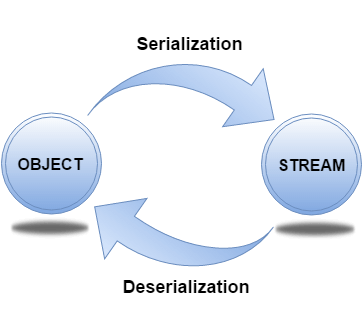 More details. More details.
200) How can you make a class serializable in Java?A class can become serializable by implementing the Serializable interface.
201) How can you avoid serialization in child class if the base class is implementing the Serializable interface?It is very tricky to prevent serialization of child class if the base class is intended to implement the Serializable interface. However, we cannot do it directly, but the serialization can be avoided by implementing the writeObject() or readObject() methods in the subclass and throw NotSerializableException from these methods. Consider the following example. - import java.io.FileInputStream;
- import java.io.FileOutputStream;
- import java.io.IOException;
- import java.io.NotSerializableException;
- import java.io.ObjectInputStream;
- import java.io.ObjectOutputStream;
- import java.io.Serializable;
- class Person implements Serializable
- {
- String name = " ";
- public Person(String name)
- {
- this.name = name;
- }
- }
- class Employee extends Person
- {
- float salary;
- public Employee(String name, float salary)
- {
- super(name);
- this.salary = salary;
- }
- private void writeObject(ObjectOutputStream out) throws IOException
- {
- throw new NotSerializableException();
- }
- private void readObject(ObjectInputStream in) throws IOException
- {
- throw new NotSerializableException();
- }
-
- }
- public class Test
- {
- public static void main(String[] args)
- throws Exception
- {
- Employee emp = new Employee("Sharma", 10000);
-
- System.out.println("name = " + emp.name);
- System.out.println("salary = " + emp.salary);
-
- FileOutputStream fos = new FileOutputStream("abc.ser");
- ObjectOutputStream oos = new ObjectOutputStream(fos);
-
- oos.writeObject(emp);
-
- oos.close();
- fos.close();
-
- System.out.println("Object has been serialized");
-
- FileInputStream f = new FileInputStream("ab.txt");
- ObjectInputStream o = new ObjectInputStream(f);
-
- Employee emp1 = (Employee)o.readObject();
-
- o.close();
- f.close();
-
- System.out.println("Object has been deserialized");
-
- System.out.println("name = " + emp1.name);
- System.out.println("salary = " + emp1.salary);
- }
- }
202) Can a Serialized object be transferred via network?Yes, we can transfer a serialized object via network because the serialized object is stored in the memory in the form of bytes and can be transmitted over the network. We can also write the serialized object to the disk or the database.
203) What is Deserialization?Deserialization is the process of reconstructing the object from the serialized state. It is the reverse operation of serialization. An ObjectInputStream deserializes objects and primitive data written using an ObjectOutputStream. - import java.io.*;
- class Depersist{
- public static void main(String args[])throws Exception{
-
- ObjectInputStream in=new ObjectInputStream(new FileInputStream("f.txt"));
- Student s=(Student)in.readObject();
- System.out.println(s.id+" "+s.name);
-
- in.close();
- }
- }
204) What is the transient keyword?If you define any data member as transient, it will not be serialized. By determining transient keyword, the value of variable need not persist when it is restored. More details.
205) What is Externalizable?The Externalizable interface is used to write the state of an object into a byte stream in a compressed format. It is not a marker interface.
206) What is the difference between Serializable and Externalizable interface?| No. | Serializable | Externalizable |
|---|
| 1) | The Serializable interface does not have any method, i.e., it is a marker interface. | The Externalizable interface contains is not a marker interface, It contains two methods, i.e., writeExternal() and readExternal(). | | 2) | It is used to "mark" Java classes so that objects of these classes may get the certain capability. | The Externalizable interface provides control of the serialization logic to the programmer. | | 3) | It is easy to implement but has the higher performance cost. | It is used to perform the serialization and often result in better performance. | | 4) | No class constructor is called in serialization. | We must call a public default constructor while using this interface. |
.
Networking Interview Questions
207) Give a brief description of Java socket programming?Java Socket programming is used for communication between the applications running on different JRE. Java Socket programming can be connection-oriented or connectionless. Socket and ServerSocket classes are used for connection-oriented socket programming and DatagramSocket, and DatagramPacket classes are used for connectionless socket programming. The client in socket programming must know two information: - IP address of the server
- port number
208) What is Socket?A socket is simply an endpoint for communications between the machines. It provides the connection mechanism to connect the two computers using TCP. The Socket class can be used to create a socket.
209) What are the steps that are followed when two computers connect through TCP?There are the following steps that are performed when two computers connect through TCP. - The ServerSocket object is instantiated by the server which denotes the port number to which, the connection will be made.
- After instantiating the ServerSocket object, the server invokes accept() method of ServerSocket class which makes server wait until the client attempts to connect to the server on the given port.
- Meanwhile, the server is waiting, a socket is created by the client by instantiating Socket class. The socket class constructor accepts the server port number and server name.
- The Socket class constructor attempts to connect with the server on the specified name. If the connection is established, the client will have a socket object that can communicate with the server.
- The accept() method invoked by the server returns a reference to the new socket on the server that is connected with the server.
210) Write a program in Java to establish a connection between client and server?Consider the following program where the connection between the client and server is established. File: MyServer.java - import java.io.*;
- import java.net.*;
- public class MyServer {
- public static void main(String[] args){
- try{
- ServerSocket ss=new ServerSocket(6666);
- Socket s=ss.accept();
- DataInputStream dis=new DataInputStream(s.getInputStream());
- String str=(String)dis.readUTF();
- System.out.println("message= "+str);
- ss.close();
- }catch(Exception e){System.out.println(e);}
- }
- }
File: MyClient.java - import java.io.*;
- import java.net.*;
- public class MyClient {
- public static void main(String[] args) {
- try{
- Socket s=new Socket("localhost",6666);
- DataOutputStream dout=new DataOutputStream(s.getOutputStream());
- dout.writeUTF("Hello Server");
- dout.flush();
- dout.close();
- s.close();
- }catch(Exception e){System.out.println(e);}
- }
- }
211) How do I convert a numeric IP address like 192.18.97.39 into a hostname like java.sun.com?By InetAddress.getByName("192.18.97.39").getHostName() where 192.18.97.39 is the IP address. Consider the following example. - import java.io.*;
- import java.net.*;
- public class InetDemo{
- public static void main(String[] args){
- try{
- InetAddress ip=InetAddress.getByName("195.201.10.8");
-
- System.out.println("Host Name: "+ip.getHostName());
- }catch(Exception e){System.out.println(e);}
- }
- }
-
Reflection Interview Questions
212) What is the reflection?Reflection is the process of examining or modifying the runtime behavior of a class at runtime. The java.lang.Class class provides various methods that can be used to get metadata, examine and change the runtime behavior of a class. The java.lang and java.lang.reflect packages provide classes for java reflection. It is used in: - IDE (Integrated Development Environment), e.g., Eclipse, MyEclipse, NetBeans.
- Debugger
- Test Tools, etc.
213) What is the purpose of using java.lang.Class class?The java.lang.Class class performs mainly two tasks: - Provides methods to get the metadata of a class at runtime.
- Provides methods to examine and change the runtime behavior of a class.
214) What are the ways to instantiate the Class class?There are three ways to instantiate the Class class. - forName() method of Class class: The forName() method is used to load the class dynamically. It returns the instance of Class class. It should be used if you know the fully qualified name of the class. This cannot be used for primitive types.
- getClass() method of Object class: It returns the instance of Class class. It should be used if you know the type. Moreover, it can be used with primitives.
- the .class syntax: If a type is available, but there is no instance then it is possible to obtain a Class by appending ".class" to the name of the type. It can be used for primitive data type also.
215) What is the output of the following Java program?- class Simple{
- public Simple()
- {
- System.out.println("Constructor of Simple class is invoked");
- }
- void message(){System.out.println("Hello Java");}
- }
-
- class Test1{
- public static void main(String args[]){
- try{
- Class c=Class.forName("Simple");
- Simple s=(Simple)c.newInstance();
- s.message();
- }catch(Exception e){System.out.println(e);}
- }
- }
Output Constructor of Simple class is invoked
Hello Java
Explanation The newInstance() method of the Class class is used to invoke the constructor at runtime. In this program, the instance of the Simple class is created.
216) What is the purpose of using javap?The javap command disassembles a class file. The javap command displays information about the fields, constructors and methods present in a class file. Syntax javap fully_class_name
217) Can you access the private method from outside the class?Yes, by changing the runtime behavior of a class if the class is not secured. More detai
Miscellaneous Interview Questions
218)What are wrapper classes?Wrapper classes are classes that allow primitive types to be accessed as objects. In other words, we can say that wrapper classes are built-in java classes which allow the conversion of objects to primitives and primitives to objects. The process of converting primitives to objects is called autoboxing, and the process of converting objects to primitives is called unboxing. There are eight wrapper classes present in java.lang package is given below. | Primitive Type | Wrapper class |
|---|
| boolean | Boolean | | char | Character | | byte | Byte | | short | Short | | int | Integer | | long | Long | | float | Float | | double | Double |
219)What are autoboxing and unboxing? When does it occur?The autoboxing is the process of converting primitive data type to the corresponding wrapper class object, eg., int to Integer. The unboxing is the process of converting wrapper class object to primitive data type. For eg., integer to int. Unboxing and autoboxing occur automatically in Java. However, we can externally convert one into another by using the methods like valueOf() or xxxValue(). It can occur whenever a wrapper class object is expected, and primitive data type is provided or vice versa. - Adding primitive types into Collection like ArrayList in Java.
- Creating an instance of parameterized classes ,e.g., ThreadLocal which expect Type.
- Java automatically converts primitive to object whenever one is required and another is provided in the method calling.
- When a primitive type is assigned to an object type.
220) What is the output of the below Java program?- public class Test1
- {
- public static void main(String[] args) {
- Integer i = new Integer(201);
- Integer j = new Integer(201);
- if(i == j)
- {
- System.out.println("hello");
- }
- else
- {
- System.out.println("bye");
- }
- }
- }
Output Explanation The Integer class caches integer values from -127 to 127. Therefore, the Integer objects can only be created in the range -128 to 127. The operator == will not work for the value greater than 127; thus bye is printed.
221) What is object cloning?The object cloning is a way to create an exact copy of an object. The clone() method of the Object class is used to clone an object. The java.lang.Cloneable interface must be implemented by the class whose object clone we want to create. If we don't implement Cloneable interface, clone() method generates CloneNotSupportedException. The clone() method is defined in the Object class. The syntax of the clone() method is as follows: protected Object clone() throws CloneNotSupportedException
222) What are the advantages and disadvantages of object cloning?Advantage of Object Cloning - You don't need to write lengthy and repetitive codes. Just use an abstract class with a 4- or 5-line long clone() method.
- It is the easiest and most efficient way of copying objects, especially if we are applying it to an already developed or an old project. Just define a parent class, implement Cloneable in it, provide the definition of the clone() method and the task will be done.
- Clone() is the fastest way to copy the array.
Disadvantage of Object Cloning - To use the Object.clone() method, we have to change many syntaxes to our code, like implementing a Cloneable interface, defining the clone() method and handling CloneNotSupportedException, and finally, calling Object.clone(), etc.
- We have to implement the Cloneable interface while it does not have any methods in it. We have to use it to tell the JVM that we can perform a clone() on our object.
- Object.clone() is protected, so we have to provide our own clone() and indirectly call Object.clone() from it.
- Object.clone() does not invoke any constructor, so we do not have any control over object construction.
- If you want to write a clone method in a child class, then all of its superclasses should define the clone() method in them or inherit it from another parent class. Otherwise, the super.clone() chain will fail.
- Object.clone() supports only shallow copying, but we will need to override it if we need deep cloning.
223) What is a native method?A native method is a method that is implemented in a language other than Java. Natives methods are sometimes also referred to as foreign methods.
224) What is the purpose of the strictfp keyword?Java strictfp keyword ensures that you will get the same result on every platform if you perform operations in the floating-point variable. The precision may differ from platform to platform that is why java programming language has provided the strictfp keyword so that you get the same result on every platform. So, now you have better control over the floating-point arithmetic.
225) What is the purpose of the System class?The purpose of the System class is to provide access to system resources such as standard input and output. It cannot be instantiated. Facilities provided by System class are given below. - Standard input
- Error output streams
- Standard output
- utility method to copy the portion of an array
- utilities to load files and libraries
There are the three fields of Java System class, i.e., static printstream err, static inputstream in, and standard output stream.
226) What comes to mind when someone mentions a shallow copy in Java?Object cloning.
227) What is a singleton class?Singleton class is the class which can not be instantiated more than once. To make a class singleton, we either make its constructor private or use the static getInstance method. Consider the following example. - class Singleton{
- private static Singleton single_instance = null;
- int i;
- private Singleton ()
- {
- i=90;
- }
- public static Singleton getInstance()
- {
- if(single_instance == null)
- {
- single_instance = new Singleton();
- }
- return single_instance;
- }
- }
- public class Main
- {
- public static void main (String args[])
- {
- Singleton first = Singleton.getInstance();
- System.out.println("First instance integer value:"+first.i);
- first.i=first.i+90;
- Singleton second = Singleton.getInstance();
- System.out.println("Second instance integer value:"+second.i);
- }
- }
-
228) Write a Java program that prints all the values given at command-line.Program - class A{
- public static void main(String args[]){
-
- for(int i=0;i<args.length;i++)
- System.out.println(args[i]);
-
- }
- }
- compile by > javac A.java
- run by > java A sonoo jaiswal 1 3 abc
Output
229) Which containers use a border layout as their default layout?The Window, Frame and Dialog classes use a border layout as their default layout.
230) Which containers use a FlowLayout as their default layout?The Panel and Applet classes use the FlowLayout as their default layout.
231) What are peerless components?The lightweight component of Swing is called peerless components. Spring has its libraries, so it does not use resources from the Operating System, and hence it has lightweight components.
232) is there is any difference between a Scrollbar and a ScrollPane?The Scrollbar is a Component whereas the ScrollPane is a Container. A ScrollPane handles its events and performs its scrolling.
233) What is a lightweight component?Lightweight components are the one which does not go with the native call to obtain the graphical units. They share their parent component graphical units to render them. For example, Swing components, and JavaFX Components.
234) What is a heavyweight component?The portable elements provided by the operating system are called heavyweight components. AWT is limited to the graphical classes provided by the operating system and therefore, It implements only the minimal subset of screen elements supported by all platforms. The Operating system dependent UI discovery tools are called heavyweight components.
235) What is an applet?An applet is a small java program that runs inside the browser and generates dynamic content. It is embedded in the webpage and runs on the client side. It is secured and takes less response time. It can be executed by browsers running under many platforms, including Linux, Windows, Mac Os, etc. However, the plugins are required at the client browser to execute the applet. The following image shows the architecture of Applet. 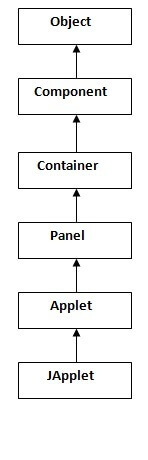 When an applet is created, the following methods are invoked in order. When an applet is destroyed, the following functions are invoked in order.
236) Can you write a Java class that could be used both as an applet as well as an application?Yes. Add a main() method to the applet.
Internationalization Interview Questions
237) What is Locale?A Locale object represents a specific geographical, political, or cultural region. This object can be used to get the locale-specific information such as country name, language, variant, etc. - import java.util.*;
- public class LocaleExample {
- public static void main(String[] args) {
- Locale locale=Locale.getDefault();
-
-
- System.out.println(locale.getDisplayCountry());
- System.out.println(locale.getDisplayLanguage());
- System.out.println(locale.getDisplayName());
- System.out.println(locale.getISO3Country());
- System.out.println(locale.getISO3Language());
- System.out.println(locale.getLanguage());
- System.out.println(locale.getCountry());
-
- }
- }
Output: United States
English
English (United States)
USA
eng
en
US
238)How will you load a specific locale?By ResourceBundle.getBundle(?) method.
Java Bean Interview Questions
239) What is a JavaBean?JavaBean is a reusable software component written in the Java programming language, designed to be manipulated visually by a software development environment, like JBuilder or VisualAge for Java. t. A JavaBean encapsulates many objects into one object so that we can access this object from multiple places. Moreover, it provides the easy maintenance. Consider the following example to create a JavaBean class. -
- package mypack;
- public class Employee implements java.io.Serializable{
- private int id;
- private String name;
- public Employee(){}
- public void setId(int id){this.id=id;}
- public int getId(){return id;}
- public void setName(String name){this.name=name;}
- public String getName(){return name;}
- }
240) What is the purpose of using the Java bean?According to Java white paper, it is a reusable software component. A bean encapsulates many objects into one object so that we can access this object from multiple places. Moreover, it provides the easy maintenance.
241) What do you understand by the bean persistent property?The persistence property of Java bean comes into the act when the properties, fields, and state information are saved to or retrieve from the storage.
RMI Interview Questions
242) What is RMI?The RMI (Remote Method Invocation) is an API that provides a mechanism to create the distributed application in java. The RMI allows an object to invoke methods on an object running in another JVM. The RMI provides remote communication between the applications using two objects stub and skeleton.
243) What is the purpose of stub and skeleton?Stub The stub is an object, acts as a gateway for the client side. All the outgoing requests are routed through it. It resides at the client side and represents the remote object. When the caller invokes the method on the stub object, it does the following tasks: - It initiates a connection with remote Virtual Machine (JVM).
- It writes and transmits (marshals) the parameters to the remote Virtual Machine (JVM).
- It waits for the result.
- It reads (unmarshals) the return value or exception.
- It finally, returns the value to the caller.
Skeleton The skeleton is an object, acts as a gateway for the server side object. All the incoming requests are routed through it. When the skeleton receives the incoming request, it does the following tasks: - It reads the parameter for the remote method.
- It invokes the method on the actual remote object.
- It writes and transmits (marshals) the result to the caller.
244) What are the steps involved to write RMI based programs?There are 6 steps which are performed to write RMI based programs. - Create the remote interface.
- Provide the implementation of the remote interface.
- Compile the implementation class and create the stub and skeleton objects using the rmic tool.
- Start the registry service by the rmiregistry tool.
- Create and start the remote application.
- Create and start the client application.
245) What is the use of HTTP-tunneling in RMI?HTTP tunneling can be defined as the method which doesn't need any setup to work within the firewall environment. It handles the HTTP connections through the proxy servers. However, it does not allow outbound TCP connections.
246) What is JRMP?JRMP (Java Remote Method Protocol) can be defined as the Java-specific, stream-based protocol which looks up and refers to the remote objects. It requires both client and server to use Java objects. It is wire level protocol which runs under RMI and over TCP/IP.
247) Can RMI and CORBA based applications interact?Yes, they can. RMI is available with IIOP as the transport protocol instead of JRMP.
Core Java: Data Structure interview questions
248) How to perform Bubble Sort in Java?Consider the following program to perform Bubble sort in Java. - public class BubbleSort {
- public static void main(String[] args) {
- int[] a = {10, 9, 7, 101, 23, 44, 12, 78, 34, 23};
- for(int i=0;i<10;i++)
- {
- for (int j=0;j<10;j++)
- {
- if(a[i]<a[j])
- {
- int temp = a[i];
- a[i]=a[j];
- a[j] = temp;
- }
- }
- }
- System.out.println("Printing Sorted List ...");
- for(int i=0;i<10;i++)
- {
- System.out.println(a[i]);
- }
- }
- }
Output: Printing Sorted List . . .
7
9
10
12
23
34
34
44
78
101
249) How to perform Binary Search in Java?Consider the following program to perform the binary search in Java. - import java.util.*;
- public class BinarySearch {
- public static void main(String[] args) {
- int[] arr = {16, 19, 20, 23, 45, 56, 78, 90, 96, 100};
- int item, location = -1;
- System.out.println("Enter the item which you want to search");
- Scanner sc = new Scanner(System.in);
- item = sc.nextInt();
- location = binarySearch(arr,0,9,item);
- if(location != -1)
- System.out.println("the location of the item is "+location);
- else
- System.out.println("Item not found");
- }
- public static int binarySearch(int[] a, int beg, int end, int item)
- {
- int mid;
- if(end >= beg)
- {
- mid = (beg + end)/2;
- if(a[mid] == item)
- {
- return mid+1;
- }
- else if(a[mid] < item)
- {
- return binarySearch(a,mid+1,end,item);
- }
- else
- {
- return binarySearch(a,beg,mid-1,item);
- }
- }
- return -1;
- }
- }
Output: Enter the item which you want to search
45
the location of the item is 5
250) How to perform Selection Sort in Java?Consider the following program to perform selection sort in Java. - public class SelectionSort {
- public static void main(String[] args) {
- int[] a = {10, 9, 7, 101, 23, 44, 12, 78, 34, 23};
- int i,j,k,pos,temp;
- for(i=0;i<10;i++)
- {
- pos = smallest(a,10,i);
- temp = a[i];
- a[i]=a[pos];
- a[pos] = temp;
- }
- System.out.println("\nprinting sorted elements...\n");
- for(i=0;i<10;i++)
- {
- System.out.println(a[i]);
- }
- }
- public static int smallest(int a[], int n, int i)
- {
- int small,pos,j;
- small = a[i];
- pos = i;
- for(j=i+1;j<10;j++)
- {
- if(a[j]<small)
- {
- small = a[j];
- pos=j;
- }
- }
- return pos;
- }
- }
Output: printing sorted elements...
7
9
10
12
23
23
34
44
78
101
251) How to perform Linear Search in Java?Consider the following program to perform Linear search in Java. - import java.util.Scanner;
-
- public class Leniear_Search {
- public static void main(String[] args) {
- int[] arr = {10, 23, 15, 8, 4, 3, 25, 30, 34, 2, 19};
- int item,flag=0;
- Scanner sc = new Scanner(System.in);
- System.out.println("Enter Item ?");
- item = sc.nextInt();
- for(int i = 0; i<10; i++)
- {
- if(arr[i]==item)
- {
- flag = i+1;
- break;
- }
- else
- flag = 0;
- }
- if(flag != 0)
- {
- System.out.println("Item found at location" + flag);
- }
- else
- System.out.println("Item not found");
-
- }
- }
Output: Enter Item ?
23
Item found at location 2
Enter Item ?
22
Item not found
252) How to perform merge sort in Java?Consider the following program to perform merge sort in Java. - public class MyMergeSort
- {
- void merge(int arr[], int beg, int mid, int end)
- {
-
- int l = mid - beg + 1;
- int r = end - mid;
-
- intLeftArray[] = new int [l];
- intRightArray[] = new int [r];
-
- for (int i=0; i<l; ++i)
- LeftArray[i] = arr[beg + i];
-
- for (int j=0; j<r; ++j)
- RightArray[j] = arr[mid + 1+ j];
-
-
- int i = 0, j = 0;
- int k = beg;
- while (i<l&&j<r)
- {
- if (LeftArray[i] <= RightArray[j])
- {
- arr[k] = LeftArray[i];
- i++;
- }
- else
- {
- arr[k] = RightArray[j];
- j++;
- }
- k++;
- }
- while (i<l)
- {
- arr[k] = LeftArray[i];
- i++;
- k++;
- }
-
- while (j<r)
- {
- arr[k] = RightArray[j];
- j++;
- k++;
- }
- }
-
- void sort(int arr[], int beg, int end)
- {
- if (beg<end)
- {
- int mid = (beg+end)/2;
- sort(arr, beg, mid);
- sort(arr , mid+1, end);
- merge(arr, beg, mid, end);
- }
- }
- public static void main(String args[])
- {
- intarr[] = {90,23,101,45,65,23,67,89,34,23};
- MyMergeSort ob = new MyMergeSort();
- ob.sort(arr, 0, arr.length-1);
-
- System.out.println("\nSorted array");
- for(int i =0; i<arr.length;i++)
- {
- System.out.println(arr[i]+"");
- }
- }
- }
Output: Sorted array
23
23
23
34
45
65
67
89
90
101
253) How to perform quicksort in Java?Consider the following program to perform quicksort in Java. - public class QuickSort {
- public static void main(String[] args) {
- int i;
- int[] arr={90,23,101,45,65,23,67,89,34,23};
- quickSort(arr, 0, 9);
- System.out.println("\n The sorted array is: \n");
- for(i=0;i<10;i++)
- System.out.println(arr[i]);
- }
- public static int partition(int a[], int beg, int end)
- {
-
- int left, right, temp, loc, flag;
- loc = left = beg;
- right = end;
- flag = 0;
- while(flag != 1)
- {
- while((a[loc] <= a[right]) && (loc!=right))
- right--;
- if(loc==right)
- flag =1;
- elseif(a[loc]>a[right])
- {
- temp = a[loc];
- a[loc] = a[right];
- a[right] = temp;
- loc = right;
- }
- if(flag!=1)
- {
- while((a[loc] >= a[left]) && (loc!=left))
- left++;
- if(loc==left)
- flag =1;
- elseif(a[loc] <a[left])
- {
- temp = a[loc];
- a[loc] = a[left];
- a[left] = temp;
- loc = left;
- }
- }
- }
- returnloc;
- }
- static void quickSort(int a[], int beg, int end)
- {
-
- int loc;
- if(beg<end)
- {
- loc = partition(a, beg, end);
- quickSort(a, beg, loc-1);
- quickSort(a, loc+1, end);
- }
- }
- }
Output: The sorted array is:
23
23
23
34
45
65
67
89
90
101
254) Write a program in Java to create a doubly linked list containing n nodes.Consider the following program to create a doubly linked list containing n nodes. - public class CountList {
-
-
-
- class Node{
- int data;
- Node previous;
- Node next;
-
- public Node(int data) {
- this.data = data;
- }
- }
-
-
- Node head, tail = null;
-
-
- public void addNode(int data) {
-
- Node newNode = new Node(data);
-
-
- if(head == null) {
-
- head = tail = newNode;
-
- head.previous = null;
-
- tail.next = null;
- }
- else {
-
- tail.next = newNode;
-
- newNode.previous = tail;
-
- tail = newNode;
-
- tail.next = null;
- }
- }
-
-
- public int countNodes() {
- int counter = 0;
-
- Node current = head;
-
- while(current != null) {
-
- counter++;
- current = current.next;
- }
- return counter;
- }
-
-
- public void display() {
-
- Node current = head;
- if(head == null) {
- System.out.println("List is empty");
- return;
- }
- System.out.println("Nodes of doubly linked list: ");
- while(current != null) {
-
-
- System.out.print(current.data + " ");
- current = current.next;
- }
- }
-
- public static void main(String[] args) {
-
- CountList dList = new CountList();
-
- dList.addNode(1);
- dList.addNode(2);
- dList.addNode(3);
- dList.addNode(4);
- dList.addNode(5);
-
-
- dList.display();
-
-
- System.out.println("\nCount of nodes present in the list: " + dList.countNodes());
- }
- }
Output: Nodes of doubly linked list:
1 2 3 4 5
Count of nodes present in the list: 5
255) Write a program in Java to find the maximum and minimum value node from a circular linked list.Consider the following program. - public class MinMax {
-
- public class Node{
- int data;
- Node next;
- public Node(int data) {
- this.data = data;
- }
- }
-
-
- public Node head = null;
- public Node tail = null;
-
-
- public void add(int data){
-
- Node newNode = new Node(data);
-
- if(head == null) {
-
- head = newNode;
- tail = newNode;
- newNode.next = head;
- }
- else {
-
- tail.next = newNode;
-
- tail = newNode;
-
- tail.next = head;
- }
- }
-
-
- public void minNode() {
- Node current = head;
-
- int min = head.data;
- if(head == null) {
- System.out.println("List is empty");
- }
- else {
- do{
-
-
- if(min > current.data) {
- min = current.data;
- }
- current= current.next;
- }while(current != head);
-
- System.out.println("Minimum value node in the list: "+ min);
- }
- }
-
-
- public void maxNode() {
- Node current = head;
-
- int max = head.data;
- if(head == null) {
- System.out.println("List is empty");
- }
- else {
- do{
-
-
- if(max < current.data) {
- max = current.data;
- }
- current= current.next;
- }while(current != head);
-
- System.out.println("Maximum value node in the list: "+ max);
- }
- }
-
- public static void main(String[] args) {
- MinMax cl = new MinMax();
-
- cl.add(5);
- cl.add(20);
- cl.add(10);
- cl.add(1);
-
- cl.minNode();
-
- cl.maxNode();
- }
- }
Output: Minimum value node in the list: 1
Maximum value node in the list: 20
256) Write a program in Java to calculate the difference between the sum of the odd level and even level nodes of a Binary Tree.Consider the following program. - import java.util.LinkedList;
- import java.util.Queue;
-
- public class DiffOddEven {
-
-
- public static class Node{
- int data;
- Node left;
- Node right;
-
- public Node(int data){
-
- this.data = data;
- this.left = null;
- this.right = null;
- }
- }
-
-
- public Node root;
-
- public DiffOddEven(){
- root = null;
- }
-
-
- public int difference() {
- int oddLevel = 0, evenLevel = 0, diffOddEven = 0;
-
-
- int nodesInLevel = 0;
-
-
- int currentLevel = 0;
-
-
- Queue<Node> queue = new LinkedList<Node>();
-
-
- if(root == null) {
- System.out.println("Tree is empty");
- return 0;
- }
- else {
-
- queue.add(root);
- currentLevel++;
-
- while(queue.size() != 0) {
-
-
- nodesInLevel = queue.size();
-
- while(nodesInLevel > 0) {
- Node current = queue.remove();
-
-
- if(currentLevel % 2 == 0)
-
- evenLevel += current.data;
- else
-
- oddLevel += current.data;
-
-
- if(current.left != null)
- queue.add(current.left);
-
- if(current.right != null)
- queue.add(current.right);
- nodesInLevel--;
- }
- currentLevel++;
- }
-
- diffOddEven = Math.abs(oddLevel - evenLevel);
- }
- return diffOddEven;
- }
-
- public static void main (String[] args) {
-
- DiffOddEven bt = new DiffOddEven();
-
- bt.root = new Node(1);
- bt.root.left = new Node(2);
- bt.root.right = new Node(3);
- bt.root.left.left = new Node(4);
- bt.root.right.left = new Node(5);
- bt.root.right.right = new Node(6);
-
-
- System.out.println("Difference between sum of odd level and even level nodes: " + bt.difference());
- }
- }
Output: Difference between sum of odd level and even level nodes: 11
|
|
Comments
Post a Comment